Blog
My blog01.

0 min
|
|
|
What Is a Website Form? How It Helps You Collect User Data
A website form is one of the simplest ways to interact with your visitors, yet it’s also one of the most powerful tools for collecting meaningful data. Whether someone wants to ask a question, request a quote, subscribe to your updates, or book a service, almost all interactions start with a form.
As a designer working with businesses across different industries, I see how often forms are underestimated. A form can seem like a small detail on a page, but it directly affects conversions, communication, and the quality of insights a business collects from its audience.
In this article, I’ll walk you through what a website form is, how it works, why it matters, and how different types of forms help you gather the right user data. I’ll also share best practices I follow when designing forms for clients.
What Is a Website Form?
A website form is an interactive element on a webpage that allows visitors to submit information. It can be as simple as an email field or as complex as a multi-step form with conditional fields, file uploads, and automated routing.
At its core, a form performs three tasks:
1. Collects information
Users enter their details - name, email, phone, preferences, files, or messages.
2. Sends the information somewhere
This could be your email, CRM, booking system, or internal dashboard.
3. Helps you process or act on that information
That might mean replying to a message, scheduling a meeting, sending a follow-up email, or analyzing the data for marketing insights.
A website form typically includes:
- Text fields
- Email fields
- Number fields
- Dropdown menus
- Radio buttons
- Checkboxes
- Date & time pickers
- File upload inputs
- Consent checkboxes (GDPR, privacy, etc.)
These fields are combined to fit the purpose of the form and the type of data you want to gather.
Types of Website Forms
Forms play different roles depending on what your business needs. Here are the most common types I use when building websites:
1. Contact Forms
For general inquiries and communication.
2. Quote Request Forms
Used by service providers who need details before giving a price.
3. Booking & Appointment Forms
Schedule calls, meetings, or in-person visits.
4. Newsletter Signup Forms
Collect emails for marketing campaigns.
5. Multi-Step Forms
Break longer processes into smaller “steps” to improve completion rates.
6. Surveys and Feedback Forms
Gather user opinions, satisfaction ratings, or product feedback.
7. Support or Ticket Submission Forms
Let users submit issues in an organized way.
8. Checkout or Order Forms
Used for selling products or services.
9. Registration Forms
For account creation, event signups, or membership systems.
How Website Forms Help You Collect User Data
Forms are one of the most reliable sources of first-party data - information users willingly share with you. This is extremely important today, especially with privacy changes and the fading relevance of third-party tracking.
Here’s the kind of data your forms can collect:
- Contact Information: Names, emails, phone numbers, essential for follow-ups.
- Business Insights: What users are searching for, their needs, their budget range, or their project details.
- Behavioral Data: Understanding what products or services people are most interested in.
- Marketing Segmentation: Forms help you separate leads into meaningful categories (e.g., “design inquiry,” “support,” “partnership”).
- Content Insights: If multiple people ask the same question, that’s a signal you should address it somewhere in your content or services.
- Purchase Intent: Forms like “Request a Quote” or “Book a Consultation” show strong sales intent.
In short: forms help you understand who your audience is and what they want, directly from the source.
How a Website Contact Form System Works
Behind every simple submit button is a workflow that ensures the form sends information properly. Here’s the general process:
1. The form is built
Using custom code or a CMS platform (Webflow, WordPress, Shopify, etc.).
2. Validation happens
The form checks if the user input is correct - valid email, required fields filled, etc.
3. The data is submitted
Once validated, the data travels to its destination:
- Your email
- CRM
- Database
- Project management tool
- Automation tool (e.g., Zapier)
4. Notifications are sent
Both you and the user may receive confirmation messages or auto-replies.
5. Data is stored or logged
Some systems keep a copy of all submissions in a dashboard for extra reliability.
6. Security layers protect the form
Tools like reCAPTCHA, spam filters, and honeypots prevent bot submissions.
7. Tracking measures performance
Using GA4 or Tag Manager, I can track:
- Form views
- Button clicks
- Successful submissions
- Drop-offs
This setup ensures your form works properly and your data flows where it needs to go.
Benefits of Using Website Forms
Website forms provide benefits for both the visitor and the business:
For visitors:
- Faster way to reach you
- Clear expectations
- Quick submissions
- Less searching for contact information
For you:
- Clean, structured data
- Easier lead qualification
- Automated workflows
- Insights directly from users
- Better conversion tracking
- Consistent communication
A single form can improve the efficiency of your entire communication funnel.
Best Practices for Creating Effective Website Forms
When I design forms for clients, these are the core principles I follow:
1. Keep it simple
Only ask for the information you need. Long forms reduce completions.
2. Make it visually clear
Use readable labels, proper spacing, and logical grouping.
3. Add inline error messages
Users should understand what went wrong immediately.
4. Optimize for mobile
Many submissions come from mobile devices, so the form layout must follow responsive design principles.
5. Provide a confirmation message
A thank-you page or success message reassures users their form worked.
6. Add security
CAPTCHA and anti-spam systems protect your inbox.
7. Set up proper email routing
Correct recipients, filters, and labeling ensure no message goes missing.
8. Track everything
Form submissions should be measured, otherwise, you can’t improve them.
These best practices make forms easier to use and more reliable.
Examples of Well-Designed Website Forms
1. Minimal Contact Form

Perfect for quick messages:
- Name
- Message
2. Multi-Step Lead Form

Ideal for more complex inquiries like project briefs.
3. Newsletter Signup Form

Just one input field, Email, delivering the highest conversion.
4. Quote Request Form
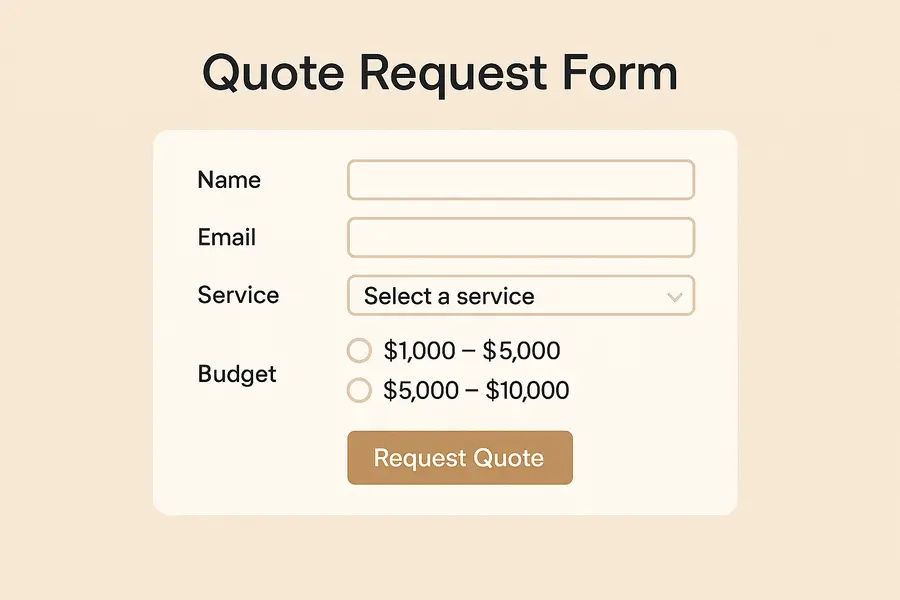
Includes conditional fields to collect only relevant data.
5. Appointment Booking Form
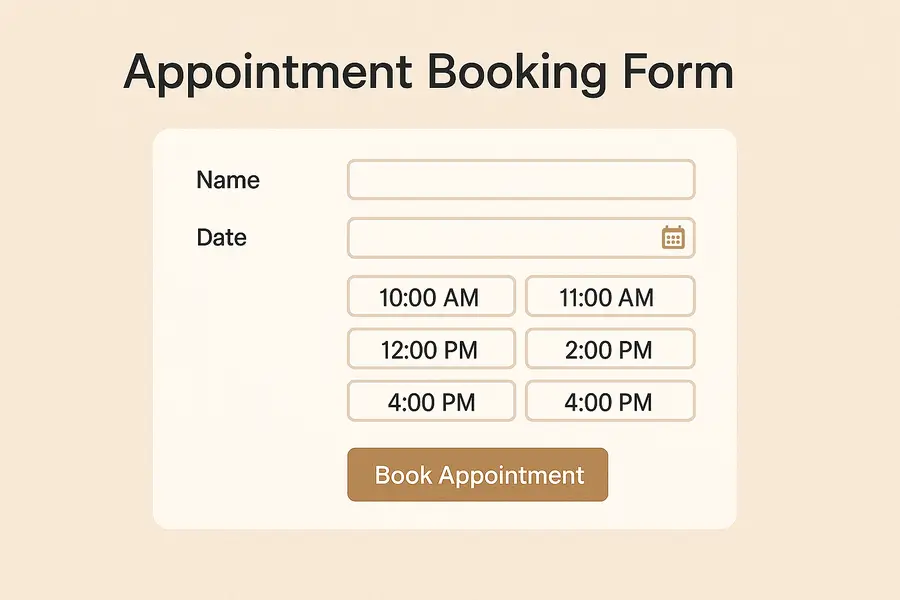
Allows users to see available time slots and schedule instantly.
When designed properly, these forms keep your communication channels organized and efficient.
FAQs
What is a form on a website used for?
To allow users to submit structured information directly through your website.
Do website forms collect personal data?
Yes, depending on the fields included. It’s important to comply with privacy laws.
How do I add a form to my website?
Through your website builder, plugins, or a custom-coded solution.
Are forms secure?
They can be secure when using captcha, SSL encryption, and server-side validation.
What’s the difference between a contact form and other forms?
A contact form is designed for communication; other forms may be for booking, checkout, or data collection.
To Sum Up
Website forms are essential tools for communication, data collection, and improving user experience. When built correctly, they help you understand your audience, generate leads, and streamline your workflows. Small mistakes, like poor routing, missing fields, or confusing layouts, can disrupt communication and lower conversions.
A good form feels seamless for the user and reliable for the business. That’s why thoughtful design, proper configuration, and correct tracking matter.
Need Help Creating or Optimizing Your Website Forms?
If you want to improve your website forms, fix issues with form submissions, or set up proper tracking and notifications, I can help.
I design clean, user-friendly forms and configure everything, from field structure to spam protection, CRM routing, and analytics tracking. Fill out a quick project brief, I’ll create something tailored and unique for your website.
Popular articles02.
In this article, I’ll break down what SEO is, how it works, and SEO strategies so you can use it to improve your site’s performance in search engines.
What Does SEO Stand For?

SEO stands for Search Engine Optimization. At its core, it’s the practice of optimizing your website to appear more prominently in search engine results, especially on platforms like Google.
When someone types a question or keyword into a search engine, they’re met with a list of results. SEO helps your website appear higher on that list by making it more relevant, valuable, and accessible to both search engines and users.
It’s not about tricking search engines; it’s about helping them understand your content and showing that your site deserves to be found.
How Search Engines Work
To understand SEO, it's helpful to know how search engines like Google find and rank content. The process includes three 3 stages: crawling, indexing, and ranking.
- Crawling: Search engines use bots (also called spiders) to scan the internet for new or updated web pages. These bots follow links from one page to another, gathering information along the way.
- Indexing: After a page is crawled, the search engine stores and organizes its content in a massive database known as the index. If your page isn’t indexed, it won’t appear in search results.
- Ranking: When a user enters a search query, the search engine scans its index and delivers a list of results it believes are the most relevant. It ranks them based on hundreds of factors, including content quality, user experience, and site authority.
SEO is about making sure your website is easy to crawl, properly indexed, and optimized to appear among the top results when people search for topics related to your business.
The Main Components of SEO
SEO is made up of several key components that work together to improve your website’s visibility in search results. These are typically grouped into three main areas: on-page SEO, off-page SEO, and technical SEO.
On-Page SEO
This focuses on the content and elements you control directly on your website. It includes:
- Using relevant keywords naturally within your content,
- Writing clear and engaging headlines,
- Optimizing title tags and meta descriptions.
- Structuring content with proper headings (H1, H2, etc.)
The goal is to create helpful, well-organized content that answers what users are searching for.

Off-Page SEO
This covers external efforts aimed at improving your website’s search engine rankings.The most important factor here is backlinks - links from other websites pointing to your content. These act as signals of trust and authority.
Other off-page elements include social sharing, brand mentions, and building relationships with other reputable websites in your industry.
Technical SEO
This ensures that search engines can effectively access, crawl, and index your site. It includes:
- Fast loading times,
- Mobile-friendly design,
- Secure website connections (HTTPS),
- Clean site architecture and internal linking,
- Avoiding duplicate content and broken links.
Why SEO Is Important
SEO plays a vital role in helping your website attract the right visitors and grow over time. Here’s why it matters:
1. Increases Visibility and Traffic
Most people don’t look past the first page of search results. SEO helps your website appear higher in those results, which means more people will find and visit your site.
2. Builds Trust and Credibility
Websites that appear higher in search results are often perceived as more reliable and credible. A strong SEO strategy helps establish your brand as a reliable source of information or services.

3. Reaches the Right Audience
SEO focuses on optimizing your content for specific keywords and topics your target audience is searching for. This helps bring in visitors who are genuinely interested in what you offer.
4. Offers Long-Term Value
Unlike paid ads that stop delivering results when you stop spending, SEO can provide consistent traffic over time. Once your content ranks well, it can continue performing for months or even years.
5. Supports Other Marketing Efforts
Good SEO improves the user experience, enhances your content strategy, and complements efforts like email marketing or social media.
Common SEO Strategies
To improve your website’s visibility in search results, you need a well-rounded approach. Here are some of the most effective SEO strategies used by businesses and content creators:
1. Keyword Research
This is the foundation of SEO. It involves identifying the words and phrases your target audience types into search engines. Tools like Google Keyword Planner, Neil Patel, Ahrefs, or SEMrush can help you find relevant keywords with high search volume and manageable competition.
Once identified, these keywords guide your content creation and optimization efforts.
2. Content Creation
Creating high-quality, useful content that answers users’ questions is key to earning visibility. Blog posts, product pages, guides, FAQs, and videos can all help drive organic traffic. Your content should be original, informative, and optimized with the keywords you’ve researched, but also written naturally for human readers.
3. On-Page Optimization
This means improving individual web pages so they rank higher and attract more relevant traffic. Important elements include:
- Title tags and meta descriptions,
- Header tags (H1, H2, etc.),
- Image alt text,
- Internal links to related content,
- Clear URL structure.
Each of these signals helps search engines understand your content and improves user experience.

4. Link Building
Links from trusted external websites serve as signals of credibility and authority for your content. Earning links naturally through great content, outreach, guest posts, or partnerships can significantly boost your site’s authority and rankings.
Quality matters more than quantity - a single link from a trusted source is more valuable than many from low-quality sites.
5. Technical SEO
Strong content alone won't perform well if your site has unresolved technical issues. Technical SEO involves optimizing the behind-the-scenes elements of your website, including:
- Fast page load speeds,
- Mobile responsiveness,
- Secure HTTPS connection,
- Clean website architecture,
- Proper indexing and crawlability.
Regular audits and maintenance help keep your site in top shape for both users and search engines.
SEO vs. Paid Ads
Both SEO and paid advertising can bring valuable traffic to your website, but they work in different ways and serve different goals.
SEO: Organic Growth Over Time
SEO focuses on improving your website’s visibility in unpaid, organic search results. With consistent effort, like optimizing content, earning backlinks, and improving site structure, you can build long-term visibility and traffic.
It doesn’t cost anything per click, but it does require time and ongoing effort to see results.
Paid Ads: Immediate but Temporary Visibility
Paid ads, such as Google Ads or social media promotions, offer instant exposure. You can appear at the top of search results right away, which is helpful for driving quick traffic during a campaign or product launch.
However, once your budget runs out, the visibility disappears. You’re paying for every click or impression, so the costs can add up quickly.
Key Differences to Know
- Cost: SEO traffic is free, while paid ads require a budget for each click or impression.
- Speed: SEO takes time to build, but results are long-lasting. Paid ads work instantly but only while the campaign is active.
- Credibility: Users tend to trust organic search results more than ads because they appear more authentic and less sales-driven.
- Sustainability: SEO delivers ongoing value, while paid traffic stops when spending stops.
While SEO is great for long-term growth, combining it with paid ads can offer a balanced strategy - using ads for immediate results and SEO for steady, lasting performance.

Final Thoughts
SEO is one of the most effective ways to drive consistent, long-term traffic to your website. By understanding how it works and applying the right strategies, you can improve your online visibility, attract the right audience, and build lasting trust with your visitors.
If you need help getting started, I can help. I specialize in creating conversion-focused websites and SEO-optimized content that not only looks great but drives real results.
Put simply, experiential marketing is a strategy that uses branded experiences, both in person and online, to engage consumers in meaningful and interactive ways. Whether it’s a pop-up event, an immersive digital experience, or a hands-on product demo, the goal is to create moments people want to join and share.
In this article, I’ll explain what experiential marketing is, why it’s so effective today, and how you can use it in your own campaigns, with examples to inspire new ideas.

What Is Experiential Marketing?
Experiential marketing is a strategy that focuses on creating memorable, real-world interactions between a brand and its audience. Instead of just telling people about a product or service, it invites them to experience it firsthand, through events, installations, pop-ups, or even virtual activations.
So, what is experiential marketing in simple terms? It’s marketing that people can physically or emotionally participate in. The goal is to create a strong, personal connection that sticks long after the experience ends.
This approach goes beyond traditional advertising by encouraging audiences to actively engage with a brand. It’s not just about promoting a message - it’s about creating a moment that people want to be part of and share.
Brands use experiential marketing to:
- Introduce new products in interactive ways;
- Build emotional loyalty through hands-on experiences;
- Generate social buzz and user-generated content;
- Stand out in a crowded digital landscape.
Whether it happens in-person or online, the key is to make people feel something - curiosity, excitement, inspiration, or delight.
Why Experiential Marketing Works
In a world where audiences are bombarded with ads every day, experiential marketing stands out because it focuses on creating real, emotional connections. People don’t just see or hear about your brand - they experience it. And experiences, unlike ads, are remembered and shared.
Here’s why experiential marketing is so powerful:
It Builds Emotional Connections
At its core, experiential marketing is about creating an emotional response, not just delivering information. While traditional advertising focuses on features, discounts, or slogans, experiential marketing aims to make people feel something about a brand.
Emotions like joy, excitement, nostalgia, or even belonging are powerful triggers. When consumers experience these feelings firsthand, they naturally associate those positive emotions with the brand behind the experience.
For example, imagine attending an exclusive product launch event where you get to test a new product months before it hits the market. The excitement and sense of being part of something special create a bond that no static ad could ever replicate.
Emotional connections don’t just improve brand recall - they build loyalty. People are more likely to support and recommend brands they feel emotionally tied to, even when competitors offer similar products or lower prices. This is a major reason why experiential marketing succeeds where traditional campaigns often fall short.

It Turns Passive Viewers into Active Participants
Traditional marketing often asks people to sit back and watch. Experiential marketing takes a different approach by inviting people to actively engage. This shift from passive to active involvement creates a more meaningful and memorable brand experience.
When someone tries a product, interacts with a brand environment, or takes part in a branded event, they’re no longer just an observer. They become part of the story. That sense of participation builds ownership and trust. It also makes the experience far more memorable than simply seeing a banner ad or scrolling past a social post.
Here’s why this matters:
- Participation builds trust by involving the audience directly;
- Doing creates stronger memories than just watching;
- Interactive experiences demand attention and increase engagement;
- People are more likely to share what they’ve experienced firsthand.
It’s Highly Shareable
One of the biggest strengths of experiential marketing is its natural ability to inspire people to share their experiences. A well-designed brand event, interactive installation, or creative activation gives people something exciting to photograph, talk about, and post online.
When participants share their experiences on social media, they expand the brand’s reach far beyond the original audience. A single memorable moment can generate hundreds or even thousands of impressions through photos, videos, and personal stories.
Here’s why sharing matters:
- Authentic exposure: Real experiences feel more trustworthy than traditional ads;
- Wider organic reach: Participants amplify the brand by sharing with their networks;
- Emotional storytelling: People enjoy sharing moments that feel exciting, personal, or meaningful;
- User-generated content: Every shared photo or post reinforces brand awareness.
This kind of organic exposure feels more authentic than paid ads. People trust recommendations and real experiences shared by friends and peers more than branded promotions. By creating experiences that are visually striking, emotionally resonant, or simply fun to share, brands can turn participants into powerful advocates.

It Creates Lasting Impressions
Most advertisements are easily forgotten, but a powerful experience stays with people long after it ends. Experiential marketing focuses on creating moments that leave a deep and lasting impact on the audience.
When people interact with a brand in a meaningful way, they form stronger memories compared to when they simply view an ad. These memories are linked to real emotions, actions, and personal engagement, making them far more durable.
Here’s why meaningful experiences leave a stronger mark:
- Emotional memories are more durable than factual messages;
- Interactive moments build deeper connections with the brand;
- Positive associations strengthen brand loyalty over time;
- Hands-on experiences are easier to recall than passive content.
A great experiential marketing campaign does more than create a temporary buzz. It builds long-term brand loyalty by giving people something they truly remember and associate with positive feelings.
By focusing on creating genuine moments rather than just messages, experiential marketing helps brands make a real, lasting impression on their audience.
Experiential Marketing Examples
To truly understand the impact of experiential marketing, it helps to look at real-world campaigns that brought brands closer to their audiences.
Here are a few standout experiential marketing examples that show how powerful the right experience can be:

1. Airbnb’s Floating House on the River Thames
To promote its "Live There" campaign, Airbnb created a full-sized floating house that sailed down the River Thames in London. The house was fully functional, with bedrooms, a living room, and even a garden.
Contest winners got to spend the night, making it a once-in-a-lifetime experience that tied perfectly to Airbnb’s mission of offering more than just places to stay. The event generated major social media buzz and news coverage, highlighting how experiential marketing can turn brand values into unforgettable moments.
2. Spotify’s “Wrapped” Personalized Experience

Spotify turned data into a personal, shareable experience with its annual “Wrapped” campaign. By creating customized playlists and listening stats for each user, Spotify allowed millions of people to relive their favorite moments and share them with friends.
Although digital, this experiential marketing approach worked because it was interactive, emotional, and highly personalized. This interactive and emotional campaign strengthened user loyalty and encouraged widespread sharing across social media.
3. IKEA’s "The Dining Club" Pop-Up
In London, IKEA opened "The Dining Club," a pop-up restaurant where guests could host their own dinner parties, cook with IKEA chefs, and experience IKEA kitchen products firsthand. Rather than simply showing off their furniture in a catalog, IKEA invited people to live it.
This interactive campaign brought their brand promise, creating spaces for real life, into the spotlight and connected with customers on a personal level.
Frequently Asked Questions
Is experiential marketing only for big brands?
No. While large companies often run high-profile experiential marketing campaigns, small businesses can create powerful experiences too. Hosting local pop-up events, interactive workshops, or creative product demonstrations are great ways for smaller brands to engage audiences meaningfully.
Does experiential marketing always need to be in-person?
Not at all. While many experiential campaigns happen face-to-face, digital experiences can be just as powerful. Virtual reality tours, interactive online events, and personalized digital experiences also count as experiential marketing when they actively involve the audience.
How can brands measure the success of experiential marketing?
Success can be measured through a mix of metrics, depending on the campaign goal. These might include event attendance, social media engagement, user-generated content, brand sentiment analysis, email sign-ups, or direct sales increases following the experience.
What makes a good experiential marketing campaign?
A successful campaign feels personal, encourages participation, and ties clearly back to the brand’s identity. It should create an emotional connection while being easy to share and talk about afterward, helping the brand’s message spread organically.
Can experiential marketing be combined with traditional marketing?
Yes. In fact, experiential marketing often works best when integrated into a larger campaign. A live experience can be promoted through ads, email marketing, and social media to maximize reach and reinforce the brand message across different touchpoints.
Conclusion
Experiential marketing works by creating real emotional connections between brands and people. It goes beyond delivering messages to offer meaningful, interactive moments that audiences remember. By inviting participation instead of passive viewing, it fosters stronger loyalty and lasting impressions.
Whether through a live event, a creative installation, or an engaging digital experience, brands that focus on creating meaningful interactions stand out in a crowded market. By making audiences feel something real, experiential marketing turns customers into advocates and helps brands become part of the stories people want to share.
A well-structured, visually appealing, and user-friendly website can improve engagement, enhance credibility, and drive conversions. This article is about why is web design important for businesses and how it impacts everything from brand perception to sales growth.
So, Why Is Web Design Important?
The first few seconds on your website can determine whether a visitor stays or leaves. In fact, 94% of first impressions are design-related, showing just how critical a well-structured, visually appealing site is for engaging visitors. Design, layout, and usability shape their perception instantly.

Your Website Creates an Instant Impression
The first few seconds on your website can determine whether a visitor stays or leaves. Design, layout, and usability shape their perception instantly. A modern, well-structured site signals professionalism, while a cluttered or outdated one can create doubt and push potential customers away.
For example, someone searching for a law firm visits two websites. One has a sleek, easy-to-navigate design with clear contact details. The other looks outdated and loads slowly. Most users will trust and choose the first one.
A strong first impression encourages visitors to stay, engage, and take action. A clean layout, fast loading speed, and clear messaging help build trust and keep users interested from the start.
A Strong Online Presence Attracts More Visitors
A well-designed website goes beyond aesthetics.It helps people find your business online. Search engines prioritize sites that are user-friendly, fast, and well-structured. If your website is difficult to navigate or slow to load, it may rank lower, making it harder for potential customers to discover you.
For example, a local bakery with a clean, mobile-friendly website featuring clear menus, location details, and customer reviews is more likely to show up in search results than a competitor with a poorly optimized site. The easier it is to find and use your website, the more visitors you’ll attract.
An effective online presence ensures that when people search for products or services like yours, they land on your site instead of a competitor’s. The right design keeps them engaged, turning visitors into loyal customers.
A User-Friendly Website Reflects Your Commitment to Customers
Your website is more than just a digital storefront, it shows how much you value your customers. If visitors can easily navigate your site, find information quickly, and complete actions without frustration, they’ll associate that smooth experience with your business as a whole.
On the other hand, a confusing or slow website can make them feel undervalued and push them toward competitors.
For example, imagine a customer looking for an appointment with a dental clinic. One website offers a clear, easy-to-use booking form, while another has outdated links and unclear instructions. The customer is far more likely to choose the clinic that made the process simple and stress-free.

A user-friendly design improves engagement, builds trust, and ensures that visitors have a positive experience from the moment they arrive. Prioritizing ease of use shows customers that you respect their time and care about their needs.
A Professional Look Builds Trust
People are more likely to do business with a company that looks credible and established. Your website’s design plays a key role in building that trust. If your site appears outdated, cluttered, or unprofessional, visitors may hesitate to engage with your brand. A polished, well-organized site reassures them that your business is legitimate and reliable.
Consider a customer looking for an online retailer. If they land on a website with:
- A clean, modern design
- Clear product descriptions and professional images
- Easy navigation and a secure checkout process
They will feel more confident making a purchase. On the other hand, a website with poor visuals, broken links, or missing information can create doubts about the company's credibility.
A professional design not only makes a strong first impression but also encourages users to trust your brand, engage with your content, and take action.
Staying Competitive Requires a Modern Website
In a crowded market, businesses with outdated or difficult-to-use websites risk losing potential customers to competitors with better online experiences. A modern, well-designed website helps you stand out and keeps visitors engaged. If your competitors offer a smoother browsing experience, faster load times, and clearer messaging, users are more likely to choose them instead.
For example, imagine two local fitness studios:
- One has a sleek, mobile-friendly website with an easy booking system and up-to-date class schedules.
- The other has an outdated design, slow load times, and no clear way to sign up.
Most potential customers will choose the first studio because it’s easier to use and more inviting. A modern website isn’t just about appearance; it’s about providing a seamless experience that keeps users coming back instead of turning to competitors.
A Consistent Brand Experience Increases Recognition
A strong brand is built on consistency, and your website should reflect that at every touchpoint. When colors, fonts, messaging, and design elements remain uniform across all pages, visitors can instantly recognize and connect with your business.

The web designing importance in branding is undeniable. A cohesive and professional website strengthens recognition and builds trust, ensuring that customers remember your business and feel confident engaging with it.
Consider a customer browsing two competing clothing brands:
- One has a cohesive website where the colors, typography, and tone match its social media and marketing materials.
- The other has an inconsistent design, with different styles on each page and conflicting messaging.
The first brand appears more professional and memorable, making it easier for customers to recall and trust. A consistent brand experience not only strengthens recognition but also builds loyalty, keeping customers engaged and encouraging repeat visits.
Your Business is Always Accessible Online
Unlike a physical store with set hours, a website keeps your business open 24/7. Customers can browse products, learn about your services, or contact you anytime, whether it’s during the day, late at night, or on weekends. This constant accessibility makes it easier for potential customers to engage with your brand on their schedule.
For example, imagine someone looking for a local repair service late at night. If your website provides clear information about your offerings, pricing, and a way to request service, they can take action immediately. If your competitor’s site lacks these details or is difficult to navigate, they may lose the customer before business hours even begin.
A well-designed website ensures that people can always find the information they need, leading to more inquiries, sales, and long-term customer relationships.
Data Insights Help You Improve and Grow
A well-designed website does more than attract visitors, it provides valuable insights into their behavior. By analyzing website data, you can understand what works, what doesn’t, and how to improve the user experience to drive better results.
For example, tracking user interactions can reveal:
- Which pages attract the most engagement
- Where visitors drop off before completing a purchase or inquiry
- How different marketing efforts impact website traffic

Imagine an online store noticing that many users abandon their carts at the checkout page. With this insight, they can test different solutions, like simplifying the checkout process or offering free shipping, to increase conversions.
By using website analytics, businesses can make informed decisions, refine strategies, and continuously improve their online presence to better serve their audience.
Frequently Asked Questions
1. How often should I update my website’s design?
Web design trends and user expectations evolve over time. It’s recommended to refresh your website every 2–3 years to keep it modern, functional, and aligned with industry standards. Regular updates to content and performance should happen more frequently.
2. Does web design really impact sales and conversions?
Yes! A well-structured, visually appealing, and easy-to-navigate website encourages visitors to stay longer, engage with your content, and take action, whether that’s making a purchase, signing up for a service, or filling out a contact form.
3. How does web design differ from web development?
Web design focuses on the visual layout, branding, and user experience, while web development involves coding and functionality. Both are essential for creating a successful website.
4. How does mobile responsiveness affect my website?
More than half of web traffic comes from mobile devices. If your site isn’t mobile-friendly, users may leave quickly, leading to lost opportunities. Search engines also rank mobile-responsive sites higher.
5. What are the key elements of a well-designed website?
A high-quality website should have:
- A clean, modern layout
- Easy navigation
- Fast loading speed
- Mobile responsiveness
- Clear calls to action (CTAs)
- Consistent branding
- Secure and accessible features

6. Why is SEO important in web design?
Good web design enhances SEO by improving site speed, structure, and usability. Search engines favor websites that provide a seamless experience, making it easier for your business to rank higher and attract more visitors.
7. How much does professional web design cost?
Costs vary based on complexity, features, and design requirements. Simple websites may be more affordable, while custom-built, feature-rich websites require a larger investment. The cost should be viewed as a long-term investment in your brand’s online success.
8. Can I design my website myself, or should I hire a professional?
DIY website builders are available, but hiring a professional ensures a unique, high-performing site that aligns with your business goals. A professional designer considers UX, SEO, and branding, helping your site stand out from competitors.
Conclusion
A well-designed website is more than just a digital presence; it’s a powerful tool that shapes first impressions, builds trust, and drives business growth. From enhancing user experience to increasing visibility in search results, web design plays a critical role in attracting and retaining customers.
The web designing advantages are clear; it keeps your business competitive, ensures 24/7 accessibility, and provides valuable insights to refine your strategy over time.
If you want to unlock the full potential of a well-designed website, I can create a professional web design that enhances user experience, strengthens trust, and makes your business stand out. Let’s collaborate to bring your vision to life.
All articles03.
Whether you're building a blog, a portfolio, a job board, or a product catalog, Webflow CMS offers a flexible and visual way to organize content and display it dynamically across your site. It removes the technical barrier while still giving you the structure and power of a traditional content management system.
If you're wondering what CMS Webflow is and how it compares to other platforms, this guide will walk you through how it works, what it includes, and why it might be the right fit for your next project.

What Is Webflow CMS?
Webflow CMS is a visual content management system built into the Webflow platform. It allows designers, marketers, and content teams to create and manage dynamic content without writing code or relying on traditional back-end systems.
Instead of working with complex databases or rigid templates, Webflow uses Collections. A collection is a custom content type that you define - such as blog posts, team members, or case studies. Each collection has fields like titles, images, links, or rich text, which can then be connected directly to the design layout using Webflow's visual editor.
So, is Webflow a CMS? Yes, it functions as a fully capable CMS, offering dynamic content management with real-time design flexibility, all inside a single platform.
Webflow CMS is a strong fit for:
- Blogs and editorial websites;
- Project or team portfolios;
- Content directories or libraries;
- Client-friendly, editable websites.
It combines structure, flexibility, and control in a way that empowers both designers and editors.
How Webflow CMS Works
At its core, Webflow CMS allows you to define content structures and visually bind them to your site’s design. It’s built to handle dynamic content without the complexity of traditional development.

Here’s how it works in practice:
1. Create a Collection
Collections are the building blocks of Webflow CMS. Each collection represents a type of content - like blog posts, team members, or services. You define the structure by adding custom fields such as plain text, rich text, images, dates, or reference fields that link to other collections.
2. Design Dynamic Templates
Once your collection is set up, Webflow automatically creates a dynamic page template. You can use the visual designer to connect elements on the page to specific fields from your collection. This means one design layout can power hundreds of unique pages, each dynamically populated with content.
3. Populate and Manage Content
You can add items to your collections manually, import them via CSV, or allow clients and editors to manage them using the Webflow Editor. Changes to collection items are reflected immediately across your site wherever that content is used.
4. Display Content Anywhere
Dynamic content isn’t limited to full pages. You can use Collection Lists to display content like blog previews, featured products, or team profiles anywhere on your site. You can also filter, sort, and style them visually.

This system makes Webflow CMS ideal for sites that need to scale or update content regularly, like blogs, portfolios, or internal directories - all without writing code or setting up a traditional CMS backend.
Using the Webflow CMS API
While Webflow CMS is built to be used without code, it also offers flexibility for developers through the Webflow CMS API. This allows you to manage content programmatically, giving you more control over how data is created, updated, or integrated from other sources.
The API is especially useful when:
- You need to sync content from external platforms or databases;
- You want to automate content creation or publishing workflows;
- You’re working with headless architectures or custom backend systems;
- You want to build custom dashboards or admin tools for editors.
With the Webflow CMS API, you can create new collection items, update existing ones, delete content, and even access site structure and project metadata. It supports RESTful endpoints and works well with tools like Zapier, Make (formerly Integromat), and custom scripts.
For teams with more complex needs or automation goals, the API provides a powerful extension to the no-code foundation of Webflow CMS.
Pros and Limitations
Like any platform, Webflow CMS has strengths and trade-offs. Understanding both will help you decide whether it’s the right solution for your project.
Pros
- Visual content management: Update dynamic content without leaving the design interface. This makes it easier for non-developers to manage and preview changes in real time.
- Custom content structures: Build exactly what you need - whether it’s a blog, portfolio, directory, or gallery, with flexible fields and templates.
- Client-friendly Editor: Clients or teammates can safely edit text, images, and content without risking layout or design errors.
- Fast and secure hosting: All CMS plans include Webflow’s fast, globally distributed hosting and built-in SSL.
- API and automation options: For teams that need advanced workflows, the Webflow CMS API opens the door to integrations and automation.
Limitations
- CMS item limits: Plans cap the number of items per site, which can be restrictive for large-scale projects.
- No native multi-language CMS: Webflow currently requires third-party solutions or custom setups for multilingual content.
- Not ideal for complex relational data: While references and multi-reference fields exist, deeply nested or highly relational content structures may be harder to manage.
- Design-first learning curve: Webflow is intuitive for designers, but may take time for traditional CMS users to adapt to the visual-first workflow.
Overall, Webflow CMS is a powerful option for design-driven, content-rich websites, especially where flexibility and visual control matter.

Conclusion
Webflow CMS offers a modern way to manage dynamic content without relying on traditional back-end systems or custom code. Whether you're building a blog, portfolio, or business site, it gives you the tools to structure content visually, streamline updates, and deliver a seamless user experience.
With features like custom collections, API access, and powerful design integration, it’s a strong choice for anyone who values flexibility and control in a no-code environment.
If you're unsure how to structure or launch your project using Webflow CMS, I specialize in professional no-code development and can help you create a high-performing, fully customized site tailored to your content needs.
This approach places real user needs at the core of every design decision. It’s not just about making something look good, but about making it useful, usable, and meaningful. Whether you're designing a mobile app, a website, or a complex software tool, applying a user-centered mindset helps you build solutions that truly solve problems.
In this guide, I’ll walk through the user centered design process step by step. But first, let’s define exactly what is user centered design and why it matters.

What Is User Centered Design?
User centered design (UCD) is a problem-solving approach that prioritizes the needs, preferences, and limitations of end users throughout every stage of the design process. Rather than building based on assumptions or internal opinions, UCD focuses on involving real users to inform decisions from start to finish.
The goal of user centered design is to create solutions that are not only functional but also intuitive and enjoyable to use. This means understanding the user’s context, identifying pain points, and continuously refining the product based on feedback.
Key User Centered Design Principles
1. Early and Continuous User Involvement
Design decisions are stronger when users are involved from the start. This includes research, interviews, usability testing, and ongoing feedback. The earlier you understand your users, the fewer assumptions you'll make.
2. Understanding the Context of Use
Knowing how, when, and why users interact with your product is essential. Context includes not only the physical or digital environment but also the user's goals, emotions, and constraints during the interaction.
3. Iterative Design
User centered design is not a one-time process. It requires cycles of design, testing, and refinement. Each iteration brings you closer to a product that truly fits user expectations.
4. Design for the Whole Experience
Good design considers the entire user journey, not just isolated screens or actions. From onboarding to support, every touchpoint should be meaningful and easy to navigate.
5. User Feedback Drives Decisions
Rather than relying solely on team preferences or trends, design choices are based on real-world data and feedback. What users say and how they behave during testing both inform how the design evolves.
Together, these user centered design principles provide a framework for building products that people find genuinely helpful and satisfying to use.

The User Centered Design Process (Step-by-Step)
A strong user centered design process follows a clear, repeatable structure that helps teams stay focused on real user needs at every stage. Here’s how it typically unfolds:
1. Research and Empathy
The first stage of the user centered design process is understanding the people you are designing for. Without real insight into user behavior, goals, and challenges, design decisions become guesswork.
This phase focuses on building empathy. It involves listening, observing, and collecting data to better understand user needs within the context of their daily lives.
Goal
To gather meaningful information about your target users and the problems they face.
Common activities include
- User interviews: Direct conversations with users to explore their experiences, expectations, and frustrations.
- Surveys and questionnaires: Broader data collection that helps identify trends and validate assumptions across a larger group.
- Observation and field studies: Watching users interact with similar products or services in real-world settings to discover hidden pain points.
- Empathy mapping: Organizing insights into what users say, think, do, and feel to build a more complete picture of their experience.
- Persona creation: Developing user profiles based on research that represent key segments of your audience, including their goals, motivations, and limitations.
Why this step matters
Strong research creates a solid foundation for the rest of the process. It ensures that every design choice is informed by real user needs rather than assumptions. When you understand users early, you reduce the risk of building a solution that doesn’t fit their expectations.

2. Define the Problem
Once user research is complete, the next step is to make sense of the findings and clearly define the problem you are trying to solve. This step turns raw data into a focused direction for the design process.
A well-defined problem acts as a guide for generating relevant ideas, avoiding unnecessary features, and keeping the project aligned with real user needs.
Goal
To translate user insights into clear problem statements that reflect both user challenges and business objectives.
Common activities include
- Synthesis of research findings: Grouping and analyzing the data collected during interviews, surveys, and observations to identify common themes or pain points.
- Users need identification: Listing what users are trying to achieve and where they face friction or confusion.
- Problem statements: Writing clear, concise descriptions of the main problems users are experiencing. For example: "Users struggle to find key information because navigation is unclear."
- How-might-we questions: Framing the problem in a way that encourages creative thinking. For example: "How might we simplify navigation so users can find information faster?"
- Business alignment: Ensuring the user problems identified also support broader business goals such as retention, engagement, or sales.
3. Ideate Solutions
With a clear problem definition in place, the next step is to generate ideas that could solve the problem. This is the creative phase of the user centered design process where teams explore a range of possible solutions before choosing a direction.
Ideation encourages diverse thinking and helps uncover ideas that may not emerge through linear planning alone.
Goal
To explore multiple ways to solve the user problem through brainstorming, sketching, and collaboration.
Common activities include
- Brainstorming sessions: Teams come together to rapidly generate ideas without judging or filtering them too early. Quantity is prioritized over quality in the beginning.
- Sketching and visual thinking: Putting ideas on paper helps clarify abstract thoughts and makes it easier to communicate concepts with others.
- Mind mapping: Organizing related ideas around a central theme to uncover unexpected connections.
- Crazy 8s or design sprints: Fast-paced ideation exercises that help produce multiple ideas in a short time frame.
- Idea prioritization: Evaluating concepts based on feasibility, impact, and alignment with user and business goals.

4. Build Prototypes
After generating and selecting promising ideas, the next step is to bring those ideas to life in a tangible format. Prototypes allow teams to explore how a concept might work before investing time and resources into full development.
Prototypes can be simple sketches or interactive digital mockups, depending on the stage of the project and the level of detail needed.
Goal
To create a testable version of the solution that can be shared with users for feedback.
Common activities include
- Wireframing: Designing low-fidelity layouts that outline structure and content placement without focusing on visual details.
- Interactive mockups: Using design tools to create clickable versions of screens or flows, simulating basic user interactions.
- Paper prototyping: Sketching interfaces on paper to quickly test ideas in early stages.
- Content mapping: Outlining text, labels, and information hierarchy to ensure that the content supports the user journey.
- Design system integration: Applying consistent components, colors, and styles to keep the prototype aligned with brand or product standards.
5. Test with Real Users
Once a prototype is ready, it’s time to put it in front of actual users. Testing reveals how people interact with your design, what works well, and where confusion or friction occurs. This step is essential to validating your ideas before moving into full development.
Usability testing helps you move beyond assumptions and base improvements on real user behavior.
Goal
To observe how users interact with the prototype, identify usability issues, and gather feedback that informs design improvements.
Common activities include
- Usability testing: Ask users to complete key tasks using the prototype while observing their actions and listening to their thoughts. Tests can be done in person or remotely.
- A/B testing: Show different versions of a feature to different users to evaluate which one performs better.
- Surveys and follow-up interviews: Collect feedback on the overall experience, pain points, and suggestions for improvement.
- Click tracking and screen recording: Record interactions to identify which parts of the interface users struggle with or avoid entirely.
- Issue logging and prioritization: Document usability problems and rank them based on severity and frequency.
6. Iterate and Improve
Design does not end after the first round of testing. In a user centered design process, iteration is a critical step that ensures the product continues to evolve based on real user feedback. Each round of refinement helps bring the design closer to what users actually need and expect.
This phase is about learning from what worked, identifying what didn’t, and making thoughtful improvements.
Goal
To refine the design based on usability feedback and prepare for further testing or final implementation.

Common activities include
- Applying changes based on user feedback: Adjust layouts, wording, interactions, or features to address pain points discovered during testing.
- Conducting follow-up testing: Test the updated version with users to confirm that the issues have been resolved and the experience has improved.
- Revisiting goals and priorities: Reassess the design direction in light of new insights, and decide whether additional iterations are needed.
- Documenting updates: Track changes and ensure that everyone on the team is aligned around the latest version.
- Finalizing high-fidelity designs: Once the design has been validated through iterations, prepare it for handoff to development.
Conclusion
The user centered design process is more than a checklist; it’s a mindset that keeps people at the heart of every decision. By following a structured approach that includes research, problem definition, ideation, prototyping, testing, and iteration, teams can create products that are not only functional but genuinely useful and intuitive.
This process helps reduce guesswork, align teams around real user needs, and produce outcomes that deliver lasting value. Whether you're designing a mobile app, a website, or a digital tool, focusing on the user from the very beginning increases your chances of success.
If you're unsure how to apply user centered design to your product or website, I offer UI/UX design services to help you create intuitive, user-focused experiences.
Both platforms have evolved considerably over the years. Wix has become known for its intuitive drag-and-drop builder, making it a favorite among beginners. Meanwhile, WordPress remains a powerhouse in flexibility and scalability, powering over 40% of all websites globally.
In this complete comparison, I’ll break down everything you need to know: ease of use, design capabilities, pricing, SEO, and scalability. By the end, you'll have a clear picture of which platform best aligns with your goals and technical comfort level.
Ease of Use
One of the biggest factors businesses consider when choosing between Wix vs WordPress is how easy it is to get started and manage the website day to day.
Wix: User-Friendly and Quick to Launch

Wix is designed with simplicity in mind. Its drag-and-drop editor allows users to build pages visually without touching code. The setup process is guided, making it an ideal option for beginners or small business owners who want to get online fast with minimal hassle.
WordPress: More Learning, More Freedom
WordPress has a steeper learning curve, especially for those unfamiliar with content management systems. However, once you're comfortable with the interface, WordPress provides a high degree of control over your website. From content structure to back-end functionality, it gives you room to build more advanced features over time.
Bottom line: If you need something up and running quickly, Wix is a strong contender. But if you're planning to scale or need more customization in the future, WordPress offers the flexibility to grow with your needs.
Design & Customization
When comparing Wix vs WordPress, customization plays a key role, especially for brands looking to stand out.
Wix: Easy Visual Customization
Wix provides an intuitive editor with a variety of styling options. You can adjust colors, layouts, spacing, and font styles easily without technical experience. For most users, especially those launching a portfolio, brochure site, or small store, this level of control is more than enough.
WordPress: Deeper Design Control

WordPress goes beyond surface-level edits. You can make layout and design changes through page builders or theme settings, and for those who are more tech-savvy, custom CSS and developer tools are available. WordPress also integrates well with third-party plugins focused on design and branding.
In short: Wix delivers an excellent visual editing experience with less complexity, while WordPress offers deeper control for those who need it.
Features & Customization
Every website has different functional needs, and that’s where Wix vs WordPress start to diverge in terms of long-term potential.
Wix: Built-In Simplicity
Wix comes equipped with essential features like contact forms, scheduling tools, galleries, social media feeds, and even basic eCommerce. The Wix App Market also adds functionality with just a few clicks. For many small to mid-sized sites, this built-in approach is more than sufficient.
WordPress: Limitless Flexibility
WordPress excels in flexibility. With thousands of plugins available, you can add nearly any feature - multilingual support, complex forms, custom user roles, automation, or SEO enhancements. You can also create custom integrations or build from scratch if you need something unique.
Summary: Wix covers a wide range of use cases right out of the box. But if your needs are more specific or likely to expand in the future, WordPress provides more options for customization.
SEO Capabilities

If organic search visibility is a priority, the platform’s SEO tools and flexibility can make a meaningful difference. So how do Wix vs WordPress compare when it comes to optimization?
Wix: Improving, with Solid Essentials
Wix has steadily improved its SEO offering. You can set custom meta titles and descriptions, update URL slugs, add alt text, and connect your site with tools like Google Search Console. For standard on-page SEO, Wix performs well, especially for simpler websites and local businesses.
WordPress: Greater Depth and Flexibility
WordPress allows more advanced SEO setups thanks to its plugin ecosystem. Tools like Yoast SEO and Rank Math provide granular control over metadata, indexing, canonical tags, schema, and more. Developers can also implement technical SEO changes directly, such as improving site speed or creating a custom site structure.
When evaluating Wix vs WordPress for SEO, both platforms are capable, but WordPress gives you more control and room to optimize deeply. That makes it a preferred choice for content-heavy sites, blog websites, or growing businesses.
Conclusion: For basic SEO, Wix works well out of the box. For more technical or large-scale SEO strategies, WordPress has a slight edge.
Pricing & Value
When choosing between Wix vs WordPress, it’s important to understand what you’re paying for - both upfront and over time. Here's how the two platforms compare in terms of cost and value:
Wix Pricing
All Wix plans include a free domain for one year, multi-cloud hosting, and access to marketing tools. Here are the current options:

- Light – $17/month: 2 GB storage, light marketing tools, and 2 collaborators.
- Core – $29/month: 50 GB storage, basic eCommerce and marketing tools, 5 collaborators.
- Business – $39/month (Recommended): 100 GB storage, standard eCommerce and marketing suite, 10 collaborators.
- Business Elite – $159/month: Unlimited storage, advanced developer platform, advanced eCommerce, and up to 100 collaborators.
WordPress Pricing
WordPress.com also includes hosting and domain registration in its plans. Pricing is listed in euros, which converts to USD based on current rates.

- Personal – €9/month: 6 GB storage, basic support, ad-free browsing, and access to dozens of themes.
- Premium – €18/month: 13 GB storage, Google Analytics integration, advanced theme customization, video uploads.
- Business – €40/month: 50 GB storage, plugin installation, SFTP/SSH access, GitHub deployments.
- Commerce – €70/month: All Business features plus WooCommerce support for online stores.
- Enterprise – Starting at $25,000/year: For large-scale, enterprise-level websites with premium hosting, performance, and security.
Conclusion: Which Platform Should You Choose?
The Wix vs WordPress debate ultimately comes down to your long-term goals and how much control you want over your website.
- Choose Wix if you want an easy, all-in-one solution with minimal setup and maintenance. It’s ideal for beginners who need a simple website without advanced functionality.
- Choose WordPress if you want full creative and technical control, better SEO tools, and a platform that can grow with your business.
In areas like customization, scalability, and especially search optimization, WordPress consistently outperforms Wix. While Wix may offer a smoother start, WordPress is the better foundation for serious growth.
If you’re ready to build a high-performing website, I can help. I offer professional web development services tailored to your brand, goals, and long-term strategy.
Let’s create a site that actually works for your business. Get in touch today to get started.
But what is organic marketing, and is it really worth the time?
Unlike paid ads, organic marketing focuses on building awareness, trust, and traffic through content, community, and consistent engagement, without paying for placement. In this article, I’ll explain how it works, share real-world examples, and help you decide whether it’s the right move for your brand.
What Is Organic Marketing?
Organic marketing refers to any marketing effort that drives traffic or engagement without paid promotion. Instead of buying ads, businesses rely on content, relationships, and visibility built over time to attract their audience naturally.
You’ll often hear this question: What is organic marketing and how does it work?
The answer lies in consistency. Through blog articles, social media posts, SEO, email newsletters, and helpful videos, organic marketing delivers value first with the goal of building long-term trust and brand awareness.
Unlike paid campaigns that stop generating results when your budget runs out, organic marketing can continue delivering traffic and leads for months or even years after content is published. It’s a slower path, but one that compounds over time.

Key traits of organic marketing:
- No ad spend required
- Built on content, search, and community
- Long-term and sustainable growth
- Focused on trust, not quick clicks
Benefits of Organic Marketing
Investing in organic marketing can feel like a slow burn, but it pays off with sustainable growth, stronger relationships, and lasting visibility. Here are some of the biggest benefits of going organic in your marketing strategy:
1. Cost-Effective and Budget-Friendly
Unlike paid ads that require ongoing spend, organic strategies rely more on time and effort than money. This makes them ideal for small businesses, startups, or teams with limited ad budgets.
Why it matters:
- No cost per click or impression;
- Content keeps attracting traffic well after it's published;
- Great ROI over time.
2. Builds Long-Term Trust
People trust organic content more than ads. Helpful blog posts, informative videos, and authentic social media posts position your brand as credible, not pushy.
Why it matters:
- Trust is harder to buy than clicks;
- Earned attention leads to higher-quality engagement;
- Builds brand loyalty over time.
3. Improves Brand Visibility and Awareness
Consistently publishing valuable content helps you stay visible across search, social, and email. You’re not just appearing - you’re providing meaningful value.
Why it matters:
- Keeps your brand top of mind;
- Supports discoverability through search and shares;
- Helps attract new audiences organically.
4. Compounds Over Time
Organic marketing is an investment. One great blog post or YouTube video can generate traffic, shares, and leads for years with only minor updates.
Why it matters:
- Content builds momentum;
- SEO rankings improve with time and authority;
- A small effort now can yield long-term returns.
5. Supports a Healthier Sales Funnel
Organic traffic often comes from people actively seeking solutions. Whether it’s through search, email, or social, these users tend to convert better and stay longer.
Why it matters:
- Better lead quality;
- Lower churn rates;
- Easier to nurture into long-term customers.
While it takes patience and consistency, the benefits of organic marketing are clear: it builds credibility, drives traffic, and creates a strong foundation for long-term growth, without being dependent on ad spend.
Common Organic Marketing Channels
A strong organic marketing strategy doesn’t rely on a single channel. Instead, it combines a variety of touchpoints to attract, engage, and nurture your audience over time, without needing to pay for reach. Below are the most effective organic marketing channels, and how each one plays a distinct role in your strategy.

1. Search Engine Optimization (SEO)
Search Engine Optimization (SEO) is a cornerstone of sustainable, long-term organic marketing. By creating high-quality, keyword-optimized content (like blog posts, how-to guides, or service pages), you can attract people who are actively searching for solutions you offer.
Why it works:
- Brings in high-intent traffic;
- Builds authority over time;
- Content can generate results long after it's published.
Example:
A small business publishes a blog post titled “Best CRM tools for startups.” With the right keywords and structure, it starts ranking in Google and brings in consistent leads every month, without spending on ads.
2. Social Media (Unpaid Posts)
Posting consistently on platforms like Instagram, LinkedIn, Facebook, or TikTok helps build awareness and engagement organically. While growth may be slower than paid ads, social content fosters community and brand connection.
Why it works:
- Encourages shares, comments, and saves;
- Humanizes your brand;
- Supports storytelling and brand voice.
Example:
A wellness coach shares daily tips and behind-the-scenes content on Instagram. Over time, she builds a loyal audience that refers friends, joins webinars, and eventually buys her coaching packages.
3. Email Newsletters
Email marketing is one of the most direct and personal organic channels. Once someone opts in, you don’t need to fight algorithms to reach them - you land directly in their inbox.
Why it works:
- You own the list (no algorithm dependence);
- Great for nurturing long-term relationships;
- High ROI over time.
Example:
An eCommerce brand builds an email list through a content upgrade (like a size guide or discount). Over time, they share styling tips, new arrivals, and reviews, driving repeat purchases with no paid ads involved.

4. Video Content (YouTube, Webinars, Reels)
Video is engaging, highly shareable, and excellent for explaining complex topics. Whether it’s educational content, product demos, or behind-the-scenes clips, video builds credibility and reach.
Why it works:
- Increases time spent with your brand;
- Great for visual learners;
- YouTube videos, in particular, can rank in search for years.
Example:
A SaaS company publishes tutorial videos on YouTube. A popular video explaining a tricky setup process becomes a top traffic source, and a key reason for new signups.
5. Community Engagement
Engaging directly with communities, on forums, Facebook groups, LinkedIn threads, Subreddits, or blog comments, helps position your brand as helpful and authentic.
Why it works:
- Builds trust in a non-salesy way;
- Helps you stay close to customer pain points;
- Encourages user-generated advocacy.
Example:
A marketer frequently answers questions in a Facebook group for startup founders. Over time, members begin tagging them in posts, visiting their website, and reaching out for consulting help.
Organic Marketing Examples
Seeing organic marketing in action can help you understand how businesses use it to grow without relying on ads. Below are a few real-world and hypothetical organic marketing examples across different industries and platforms.
1. A Blog That Drives Consistent Leads
A small accounting firm writes a blog post titled “Tax Tips for Freelancers.” The post is optimized for SEO and answers a common question. Within a few months, it ranks on page one of Google and becomes one of their top lead generators. They didn’t run a single ad - just published valuable, well-structured content.

2. A Social Post That Goes Viral
A personal trainer shares a short, relatable fitness reel on Instagram showing a “before and after” client journey. It resonates with viewers, gets shared widely, and gains thousands of views. The trainer gains followers and books several new consultations - all from one unpaid post.
3. A YouTube Channel That Builds Authority
A tech startup publishes weekly videos explaining common problems their software solves. Over time, several of the videos start ranking in both YouTube and Google search results. These videos bring in steady traffic to their website and lead to trial sign-ups - all without any paid promotion.
4. A Newsletter That Converts
An eCommerce brand launches a newsletter with tips, styling inspiration, and exclusive previews. As their list grows, it becomes one of their top-performing sales channels, especially during new product launches, without spending anything on ads.
5. A Founder Active in Online Communities
A marketing consultant answers detailed questions on LinkedIn and in a few private Slack groups. They regularly share insights without pitching their services. Over time, this builds reputation and trust, resulting in inbound inquiries, referrals, and partnerships driven by visibility, not ad spend.
Is Organic Marketing Worth It?
If you're looking for fast results or launching a time-sensitive campaign, organic marketing might feel too slow. But for brands focused on building long-term visibility, trust, and engagement, it can be one of the most valuable investments you make.

Organic marketing works best when:
- You’re building a brand for the long haul;
- You're aiming to gradually decrease dependence on paid advertising;
- You’re willing to invest in content, consistency, and community.
It’s not always the right fit if you need immediate conversions or lack the resources to maintain a steady effort. But even then, it can serve as a powerful complement to your paid strategy, laying the groundwork for more efficient growth.
Conclusion
Organic marketing isn’t a shortcut; it’s a foundation. It builds brand credibility, nurtures trust, and creates marketing assets that keep working long after they’re published.
Whether you’re writing blog posts, sending helpful emails, answering questions in communities, or showing up on social media - these small, unpaid efforts add up. Over time, they drive steady traffic, attract qualified leads, and reduce your dependency on paid channels.
If you're playing the long game, organic marketing isn’t just worth the time - it’s essential.
That’s where multichannel marketing comes in. It’s a strategic approach that allows businesses to engage audiences across a variety of platforms, each tailored to how people prefer to communicate and consume content.
In this article, I’ll break down what multichannel marketing is, how it compares to omnichannel strategies, and share practical tips to help you maximize your reach and ROI. Whether you’re just getting started or looking to refine your existing efforts, these insights will help you create a more effective, audience-focused marketing plan.

What Is Multichannel Marketing?
Multichannel marketing is a strategy that uses multiple communication channels to reach and engage potential customers. These channels can include email, social media, search engines, paid ads, SMS, direct mail, and more, each acting as a distinct touchpoint within your marketing ecosystem.
The core idea is simple: instead of relying on one method, you meet your audience wherever they already spend their time.
Unlike omnichannel marketing, where all channels are fully integrated and share data, multichannel strategies often treat each channel separately. That means your Instagram ad campaign, your newsletter, and your website’s SEO may all be optimized independently, but still contribute to a shared goal, such as lead generation or sales.
Key characteristics of multichannel marketing:
- Channels may operate in silos with limited data sharing;
- Each platform is optimized for its own audience and format;
- The customer can enter the funnel from any point - email, social, search, etc.
It’s a flexible, scalable approach that allows you to expand your visibility and reach a broader audience without requiring full infrastructure integration.
Multichannel vs Omnichannel Marketing
While the terms are sometimes used interchangeably, multichannel and omnichannel marketing represent two distinct approaches to customer engagement, and knowing the difference can help you make smarter marketing decisions.
Multichannel Marketing
This approach involves reaching customers through multiple platforms like social media, email, paid ads, and more, but each channel typically works independently. For example, your email campaigns and paid ads might promote the same product but aren’t connected in how they track user behavior or tailor content.
The customer experience can vary from one platform to another, and data is often siloed. This setup gives you flexibility and reach, especially when you’re managing campaigns across different departments or tools.

Omnichannel Marketing
Omnichannel takes things a step further by integrating all platforms into a unified, seamless experience. It’s customer-centered and designed to make every touchpoint feel connected, whether someone interacts with your brand via website, app, email, or in-store.
For instance, a customer who browses a product on your site might receive a follow-up email with a personalized recommendation, and then see that same product featured when they return to your app or visit your store. All actions are synced, and the user journey feels continuous.
The key difference?
Multichannel focuses on presence across many platforms. Omnichannel focuses on consistency across all of them. Both can be effective, but multichannel marketing is often a more practical starting point for businesses that want to expand their reach without needing full infrastructure integration.
Why Multichannel Marketing Matters
Today’s customers don’t follow a straight path, they bounce between platforms, devices, and touchpoints before making a decision. If your marketing only shows up in one place, you risk losing visibility and relevance. That’s why multichannel marketing is so valuable: it allows you to be present across the channels your audience already uses.
Here are a few key reasons multichannel marketing matters:
1. It Expands Your Reach
Every platform has its own audience. Some users spend hours on Instagram, others prefer newsletters, and many rely on search engines to research before buying. A multichannel approach helps you connect with more people in more places.
2. It Increases Your Chances of Conversion
The more touchpoints a customer has with your brand, the more likely they are to take action. Repetition across different platforms can build trust, reinforce your message, and keep your brand top of mind.ʼ

3. It Provides Flexibility and Resilience
When you’re present on multiple platforms, your success doesn’t depend on a single channel. If one ad platform becomes too expensive or one algorithm changes, your other channels continue to deliver results.
4. It Supports Smarter Testing and Optimization
With multiple platforms in play, you can test different messages, visuals, and formats to see what resonates best, and then adjust your strategy based on real data.
7 Actionable Tips to Maximize Multichannel Marketing ROI
Executing a multichannel strategy isn’t just about being present on many platforms, it’s about making each channel work toward your broader business goals. Below are seven practical tips to help you get the most out of your multichannel marketing efforts.
1. Know Your Audience Across Channels
Understand how your target audience behaves on each platform. Users on LinkedIn may expect industry insights, while Instagram audiences respond better to visual storytelling. Segment your audience by behavior and tailor your messaging accordingly.
2. Tailor Content to Each Platform
Don’t copy and paste the same message everywhere. Instead, adjust your content to suit the tone, format, and expectations of each channel. A carousel post on Instagram, a case study for email, and a how-to video for YouTube can all support the same campaign goal in unique ways.
A well-designed, conversion-focused website can serve as the central hub for your multichannel strategy, reinforcing your brand message and improving performance across every platform.
3. Align Messaging and Branding
Even though your content should be platform-specific, your brand voice, visuals, and core message should remain consistent. This creates a more cohesive customer experience and builds trust, regardless of where someone encounters your brand.
4. Use Data to Refine Your Strategy
Track performance on each platform individually and look for trends across channels. Are certain audiences converting better from email than from ads? Are organic posts performing better than paid? Use the insights to identify what works and rethink what doesn’t.
5. Retarget Based on Behavior
Multichannel campaigns work best when they’re connected. Use retargeting tools to show ads to users who’ve clicked an email, visited your site, or abandoned a cart. This adds continuity and helps guide users along the funnel.
6. Use Automation to Scale
Leverage marketing automation tools to deliver the right message at the right time, without overwhelming your team. Set up workflows to follow up via email after a form submission or trigger SMS messages after specific actions.
7. Test, Learn, Repeat
Multichannel marketing offers endless opportunities for testing - subject lines, CTAs, visuals, timing, and more. Small experiments over time help you fine-tune your strategy and improve ROI with every campaign.

Common Challenges (and How to Overcome Them)
While multichannel marketing offers huge potential, it also comes with a unique set of challenges, especially when trying to maintain consistency, clarity, and performance across platforms. Here are some of the most common issues businesses face, along with practical ways to address them:
1. Channel Silos
When each platform is managed separately, it’s easy for data and insights to become disconnected. This can lead to duplicated efforts or missed opportunities.
How to fix it: Use centralized tools like a CRM or marketing automation platform to track user interactions across channels. Share insights across teams to improve alignment and coordination.
2. Inconsistent Messaging
If your messaging varies too much across platforms, it can confuse your audience and dilute your brand.
How to fix it: Create brand guidelines that outline your tone, visuals, and key messaging. Then adapt those guidelines to each platform without losing the core brand identity.

3. Overlapping or Conflicting Campaigns
Running multiple campaigns without coordination can result in users seeing conflicting messages, or being bombarded with too many touchpoints.
How to fix it: Use a campaign calendar or planning tool to schedule and align all marketing efforts. Monitor overlaps and ensure each channel complements the others.
4. Attribution Complexity
It can be hard to tell which channel deserves credit for a sale or conversion when multiple touchpoints are involved.
How to fix it: Implement multi-touch attribution models or use Google Analytics with UTM parameters to get a better sense of how each channel contributes to the customer journey.
5. Resource Constraints
Managing content and campaigns across multiple platforms can quickly stretch a small team thin.
How to fix it: Start with the channels that bring the highest return, then expand gradually. Use repurposing techniques to adapt content across platforms instead of creating everything from scratch.
Conclusion
Multichannel marketing isn’t just about being present everywhere; it’s about showing up with purpose. By reaching customers across the platforms they use most, you increase visibility, strengthen engagement, and create more opportunities to convert.
While it may not offer the seamless integration of an omnichannel approach, multichannel marketing is a highly effective and scalable way to build a stronger digital presence. With the right strategy, tools, and consistency, you can drive meaningful results, without overwhelming your team.
Start by focusing on 2–3 core channels, tailor your content to each, and let your data guide the next move. From there, you can refine, optimize, and grow your impact one channel at a time.
In this article, I’ll explain what a modal in web design is, how it works, and when it’s appropriate to use. You’ll learn where modals are most effective, what pitfalls to avoid, and how to implement them as part of a user-friendly, goal-oriented design.
Whether you’re building a new website or refining an existing one, understanding modal web design will help you create smoother, more efficient user journeys.
What Is a Modal in Web Design?
A modal in web design is a user interface element that appears on top of the main content to deliver a specific message or request an action. It typically dims or disables the background and requires the user to interact with the modal before continuing.

In simple terms, a modal is a focused popup window that creates a temporary interaction layer. It’s used to prompt users to make decisions, complete tasks, or acknowledge important information, without navigating away from the current page.
Modals are part of many modal web design systems because they allow for streamlined interactions and can save users time when used correctly.
It’s important to note that modals often get confused with popups. The difference? A modal is usually triggered by user action (like clicking a button), while website popups can appear automatically. Modals also typically block background interaction, forcing the user to focus.
Key Characteristics of Modal Web Design
Modals are powerful UI elements that provide a focused way to engage users. But to use them well, it’s important to understand their defining traits. Below are the key characteristics that distinguish a modal from other interface elements, and explain why they’re so widely used in modal web design.
1. Overlay Effect
Modals always appear on top of the main page content, accompanied by a dimmed or blurred background. This overlay effect is designed to reduce distractions and isolate the user’s attention on the modal window itself.
It creates a visual hierarchy, signaling that what’s inside the modal is more urgent or important than what’s behind it. Until the user interacts with or dismisses the modal, the rest of the content becomes visually and functionally secondary.
2. Focused Interaction
The essence of modal web design is that it demands the user’s full attention. Unlike tooltips or dropdowns, modals temporarily disable interaction with the rest of the page. Users must complete an action, such as submitting a form, making a choice, or closing the window, before they can return to what they were doing.
This makes modals ideal for critical decisions, confirmations, or steps that shouldn’t be skipped.
3. Temporary and Contextual
Modals are designed for temporary use. They’re not meant to deliver long-form content or support complex navigation. Instead, they serve specific, contextual purposes, like displaying a login form, previewing product details, or showing a warning message.
Since they appear only when triggered by an action (like clicking a button), modals should feel like a natural extension of the user’s journey, not an interruption.
4. Clear Call to Action (CTA)
Every modal should guide the user toward a decision or next step. That’s why a strong CTA is essential, whether it’s “Submit,” “Cancel,” “Continue,” or “Close.” Without a clear CTA, the user may feel lost or uncertain about what to do next.
Good modal design also includes visual hierarchy in button placement and color contrast to make actions obvious and accessible.
5. Limited Distraction
A well-designed modal is clean and to the point. It avoids unnecessary design elements that could confuse or overwhelm the user. This includes limiting the use of animations, keeping copy concise, and avoiding cluttered layouts.
Minimalism in modal design supports faster decision-making and a smoother user experience, especially on mobile devices, where space is limited.
Getting these small UX details right, like when and how to use modals, can significantly improve the overall user experience and is often a key part of thoughtful web design.
Common Use Cases for Modals
Now let’s look at where they’re most effectively used. Modals can streamline user interaction, simplify complex tasks, and provide quick access to important actions, when applied thoughtfully.

Here are some of the most common and practical use cases for modal web design:
1. Login and Sign-Up Forms
One of the most familiar examples of modals is the login or sign-up window. Instead of redirecting users to a separate page, a modal allows them to log in quickly and return to what they were doing.
Why it works:
- Keeps users on the same page;
- Reduces friction during entry points;
- Provides a quick, familiar interaction.
2. Confirmation Dialogs
Modals are often used to confirm critical actions, like deleting data, submitting a form, or exiting without saving. These dialogs prevent accidental decisions by requiring a deliberate response.
Why it works:
- Interrupts the flow at key decision points;
- Encourages user accountability;
- Helps prevent irreversible actions.
3. Promotional Pop-Ups and Offers
Modals are also popular for time-sensitive announcements like discounts, newsletter subscriptions, or special promotions. These can be triggered by behavior (e.g., exit intent) or time spent on the page.
Why it works:
- Grabs attention without a full redirect;
- Encourages conversion at key moments;
- Can be personalized for higher relevance.

4. Product Previews or Quick Views
E-commerce sites often use modals to let users preview product details without navigating away from the category or search results page. This makes browsing faster and more seamless.
Why it works:
- Reduces clicks and page loads;
- Keeps users within their browsing context;
- Increases likelihood of continued exploration.
5. Image Galleries and Media Playback
In portfolios or media-heavy websites, modals are used to showcase full-size images, videos, or documents in a clean and distraction-free layout.
Why it works:
- Delivers immersive viewing without leaving the page;
- Makes it easy to close and return to the gallery;
- Ideal for creative, visual-first designs.
Pros and Cons of Using Modals
While modals can enhance usability when used correctly, they also carry risks if misused or overused. Like any design pattern, they should support, not disrupt, the user journey.
Let’s explore the key advantages and potential drawbacks of modal web design to help you decide when it’s the right solution.
Pros of Using Modals
1. Focused User Attention
Modals isolate content by overlaying the main page, allowing users to concentrate on one specific action or decision without distractions.
2. Efficient Use of Space
Instead of redirecting users to new pages, modals present content or forms within the same view, ideal for quick interactions like logging in or confirming actions.
3. Supports Task Completion
By pausing the background content, modals encourage users to complete an action before continuing, which can increase conversions and form submissions.
4. Ideal for Contextual Content
Since modals are triggered by user actions (like clicking a button), they provide content that feels timely and relevant, such as previews or quick settings.

Cons of Using Modals
1. Disrupts User Flow
Poorly timed modals, especially ones that appear unexpectedly, can interrupt browsing and lead to user frustration or higher bounce rates.
2. Accessibility Challenges
If not implemented properly, modals can be difficult for screen readers, keyboard navigation, or mobile users to interact with. Many fail basic accessibility standards.
3. Risk of Overuse
When overused, such as repeated pop-ups or stacking modals, they can feel invasive and cluttered, negatively impacting user trust and engagement.
4. Not Always Mobile-Friendly
On smaller screens, modals can be hard to navigate or dismiss, especially if they include too much content or lack clear close options.
Conclusion
Modals are a valuable part of modern web interfaces when used with clarity and purpose. They help streamline user actions, highlight key decisions, and improve interaction flow, especially when paired with clean, accessible design. Like any pattern, the key lies in thoughtful implementation: knowing when to use them, how to design them, and where they add the most value.
If you're refining your site's interaction patterns, modals can be a small change that makes a big difference in usability and engagement.