Blog
Our blog

0min
|
Brand Marketing
|
Brand Marketing Explained: Why It Matters More Than Ever
In today’s competitive market, standing out takes more than a good product or service. It requires a strong brand that people recognize, trust, and connect with. This is where brand marketing comes in. It’s a long-term strategy focused on shaping how customers perceive your business, building loyalty, and driving recognition across every touchpoint.
Unlike performance marketing, which is driven by short-term goals, brand marketing positions your business for sustained growth. When done right, it creates emotional connections that influence buying decisions and encourage repeat customers.
Understanding the core brand marketing definition helps you see it not just as a marketing tactic, but as a strategic foundation. In this article, I’ll explore why brand marketing matters now more than ever, the essential elements of a winning brand marketing strategy, and the techniques and metrics that help measure success.

What Is Brand Marketing?
Brand marketing takes a long-term approach to building a company’s identity, reputation, and emotional connection with its audience. Rather than focusing on quick sales, it’s about shaping how people perceive and relate to your brand over time.
The core brand marketing definition involves more than just logos and visuals. It’s about delivering a consistent message, tone, and experience that reflects your brand values and resonates with your ideal customers. Every interaction, from your website and social media to packaging and customer service, plays a role in shaping your brand’s image.
A strong brand marketing strategy isn’t just about looking good. It’s about positioning your brand in a way that stands out, builds trust, and encourages loyalty. While products and services may change, the perception you create through brand marketing becomes your competitive advantage.
Why Brand Marketing Matters Today
In a digital world where customers are constantly bombarded with content, ads, and choices, it’s harder than ever to earn attention, and even harder to keep it. This is why brand marketing matters more today than at any point before.
A well-executed brand marketing strategy helps your business stand out by building familiarity and trust. When people recognize and relate to your brand, they’re more likely to choose you over competitors, even if your price isn't the lowest.
Other reasons why brand marketing is more important than ever:
- It drives loyalty. Consumers stick with brands they feel aligned with emotionally, not just logically.
- It reduces reliance on ads. As data privacy regulations limit paid targeting, your brand becomes a long-term growth engine.
- It influences perception. People remember stories and experiences more than sales pitches.
- It supports every channel. From SEO and social media to customer service, brand marketing strengthens your overall marketing performance.
Even in tough markets, strong brands perform better. When customers trust your brand, they’re more forgiving, more vocal in their support, and more likely to return - all of which are key brand marketing metrics that matter long-term.

The Benefits of Strong Brand Marketing
Strong brand marketing goes far beyond recognition; it drives real, measurable business value. While the results may not always be instant, the long-term impact can be seen across customer loyalty, pricing power, and overall growth.
Here are some key benefits of investing in a strong brand marketing strategy:
- Builds trust and credibility: When your messaging is consistent and aligned with your values, people are more likely to believe in your brand and recommend it to others.
- Encourages loyalty and repeat business: Customers tend to stay with brands they feel connected to. Emotional loyalty is more powerful than transactional incentives.
- Allows for premium pricing: A strong brand increases perceived value. People are often willing to pay more for products from brands they trust and admire.
- Drives organic growth: Word-of-mouth marketing, social sharing, and brand advocacy happen naturally when people love your brand.
- Improves performance across other channels: Whether you’re running ads, sending emails, or publishing content, strong brand recognition boosts engagement and results across the board.
- Provides resilience in tough markets: During downturns or high competition, established brands maintain customer confidence and weather challenges more effectively.
Key Elements of a Successful Brand Marketing Strategy
A strong brand marketing strategy is built on more than just a catchy logo or a memorable slogan. It’s a carefully planned framework that shapes how your audience perceives, interacts with, and remembers your brand over time.
1. Clear Brand Identity
Your brand identity includes your logo, color scheme, typography, imagery, and brand voice. But it’s more than just visuals, it’s how all these elements work together to tell your story.
A consistent identity makes your brand instantly recognizable across your website, packaging, and social media. This builds trust and familiarity - key outcomes of strong brand marketing.
Your website is often the first impression. Professional website design can help bring your identity to life and create a seamless experience for your audience.
2. Compelling Brand Story and Purpose
Behind every successful brand is a story: why it exists, what it believes in, and who it serves. Your brand story humanizes your business and helps customers connect with you on a deeper level.

A strong brand purpose goes beyond profit. It reflects values, mission, and vision, guiding every business decision and marketing message. In brand marketing, this emotional connection is what turns customers into loyal advocates.
3. Strategic Brand Positioning
Brand marketing positions your business in the minds of your target audience. Strategic positioning answers the questions:
- What do we stand for?
- Who are we for?
- What sets us apart?
Positioning helps you claim a distinct space in your industry, especially when many competitors are selling similar products. Without it, your messaging risks blending in or feeling irrelevant.
4. Consistency Across All Touchpoints
A successful brand marketing strategy relies heavily on consistency. Every interaction, whether it's through your website, email newsletter, product packaging, or in-person experience, should reflect your brand's tone, values, and style.
Inconsistent messaging can confuse or alienate your audience. On the other hand, brands that maintain consistency build a sense of reliability and professionalism, which are essential for trust.
5. Emotional Connection Through Storytelling
Strong brands resonate emotionally. People are more likely to support brands that align with their beliefs, aspirations, or lifestyle. This emotional resonance is built through thoughtful brand marketing techniques like storytelling, user-generated content, testimonials, and cause-driven campaigns.
It’s not just about what you sell; it’s about why it matters.
6. Value-Driven Content and Experience
Every piece of content you publish, from blog articles to social media posts, is an opportunity to reinforce your brand values and voice. Educational, helpful, or entertaining content positions your brand as a reliable resource, while every customer interaction reinforces the experience you promise.
Together, content and customer experience form the bridge between strategy and reality in brand marketing.
7. Measurable Brand Marketing Metrics
Finally, no strategy is complete without measurement. While brand marketing isn’t always as immediately trackable as performance campaigns, there are still essential brand marketing metrics to monitor:
- Brand awareness (search volume, mentions, impressions)
- Brand sentiment and reputation (reviews, social listening)
- Customer loyalty (repeat purchase rate, Net Promoter Score)
- Engagement and reach (social media, email open rates)
Tracking these metrics helps you evaluate what’s working and where to adjust, ensuring your brand continues to grow in relevance and impact.
How to Start Building or Strengthening Your Brand
Whether you're launching a new business or looking to refresh an existing one, developing a strong brand marketing strategy is a smart investment. You don’t need a massive budget to get started, but you do need clarity, consistency, and intention.
Here are the steps to start building or strengthening your brand from the ground up:

1. Define Your Brand Purpose and Positioning
Start by asking foundational questions:
- What does your brand stand for?
- Who are you trying to reach?
- What problems do you solve better than your competitors?
Clarity in these areas helps define your brand marketing positions, ensuring you occupy a distinct space in the market and speak directly to the right audience.
2. Build a Consistent Visual and Verbal Identity
Once your brand strategy is clear, develop your identity:
- Visual: logo, color palette, fonts, imagery
- Verbal: tone of voice, tagline, key messaging pillars
Make sure these are applied consistently across all platforms - website, social media, emails, packaging, and even customer support. This cohesion builds familiarity and trust.
3. Focus on Storytelling and Emotional Connection
Great brands connect with people emotionally, not just logically. Share your backstory, values, team culture, and customer success stories. These are all part of effective brand marketing techniques that humanize your business and create relatability.
4. Deliver a Consistent Experience Across Channels
Every brand interaction counts. That means aligning your visuals, tone, and behavior whether someone sees your ad, browses your site, or contacts support. The more consistent and intentional you are, the stronger your brand presence becomes.
Even small businesses can create great experiences by focusing on the details that matter: clear communication, thoughtful design, and a seamless customer journey.
5. Create and Share Value-Driven Content
Content is one of the most powerful tools in brand marketing. Blogs, videos, social posts, and emails aren’t just for promotions, they help you demonstrate expertise, share your values, and engage with your audience.
Use content to reinforce your position, showcase your personality, and provide value before asking for a sale.
6. Track Key Brand Marketing Metrics
As your brand grows, monitor how it’s performing. Key brand marketing metrics include:
- Brand awareness (Google Trends, search volume)
- Engagement (likes, comments, shares, time on site)
- Brand loyalty (repeat customers, referrals)
- Perception (customer feedback, social listening tools)

To Sum Up
In a world of endless options and shrinking attention spans, brand marketing is no longer optional - it's essential. It’s what turns a business into a trusted name, a product into an experience, and a customer into a loyal advocate.
A strong brand marketing strategy positions your business for long-term success. It helps you stand out, connect emotionally, and grow sustainably, even in a crowded or competitive market. From your identity and story to the way you interact with customers, every detail plays a role in how your brand is perceived and remembered.
By applying proven brand marketing techniques, focusing on consistency, and tracking the right brand marketing metrics, you can build a brand that people believe in, and come back to again and again.
The most successful businesses today aren’t just selling products. They’re building brands that matter.

0min
|
Design
|
Top 10 Core Design Principles Every Creator Should Know
Behind every well-crafted interface are core design principles that bring order, clarity, and flow. They serve as practical guidelines, helping each element work together toward a clear purpose and a more intuitive user experience.
In a world where attention spans are short and first impressions matter, understanding core design principles is essential for creating intuitive, visually engaging, and user-friendly experiences. Whether you’re a designer improving your craft, a developer making UI decisions, or a business owner reviewing creative work, knowing these foundations helps you make smarter design choices. In this article, we’ll explore the core design principles that define strong design, why they matter, how they work, and how to apply them effectively in real-world projects.

What Are Design Principles?
Design principles are the fundamental rules and guidelines that shape how we create and evaluate visual experiences. They help ensure that every design decision, from layout and spacing to color and typography, serves a clear purpose and contributes to a cohesive, user-friendly result.
Rather than dictating exactly how a design should look, principles offer a flexible framework for solving visual problems and communicating ideas effectively. Whether you're building a website, designing a logo, or developing a product interface, these principles help you create work that’s not only beautiful but also functional.
At their core, design principles help balance creativity with clarity, so that every design feels intentional, intuitive, and engaging for the user.
The Importance of Following Core Design Principles
Design is about more than just making things look good - it’s about making things work. When core design principles are applied consistently, they help create experiences that are easy to understand, visually appealing, and aligned with user expectations.
Before a single word is read, your website’s design is already being judged. A study found that users form a first impression of a website in just 50 milliseconds - faster than the blink of an eye. In that instant, they're deciding whether to stay… or leave.
Here’s why these principles matter:
- They improve usability – A design that follows structure, alignment, and hierarchy guides users effortlessly through information, reducing confusion and frustration.
- They support clarity – Good UI/UX design communicates clearly. Whether it’s a call-to-action, a product feature, or a navigation menu, principles like contrast and proximity ensure the message gets across.
- They create visual harmony – Balanced layouts, consistent spacing, and well-chosen typography create an aesthetic that feels intentional and professional.
- They boost engagement – When users can find what they need quickly and enjoy interacting with your design, they’re more likely to stay, click, and convert.
- They build brand credibility – A polished, consistent design reflects attention to detail and builds trust with your audience.
On the flip side, ignoring these principles can lead to cluttered interfaces, poor user experiences, and missed opportunities to connect with your audience. Mastering the fundamentals ensures that your creative work not only looks great, but performs even better.

10 Core Design Principles to Improve Every Project
While creativity plays a big role in design, core principles help keep that creativity grounded in purpose. These principles are used across every discipline of visual design, from UI and UX to branding and product layout. Mastering them gives you the tools to solve design challenges and communicate ideas clearly.
1. Hierarchy
Hierarchy is one of the most essential design principles; it guides the viewer’s eye and creates a clear sense of order. By using size, color, spacing, and typography, designers can control what gets noticed first and what supports it. A headline that’s larger and bolder than the rest of the text is a simple but effective example of visual hierarchy in action.

This principle is closely related to design principles emphasis, which focuses on making the most important element stand out. Without a clear hierarchy, users can feel overwhelmed or unsure where to look. But with it, they can navigate content quickly and intuitively, whether they’re scanning a landing page, viewing a dashboard, or reading a product description.
2. Balance
Balance in design refers to the visual distribution of elements so that no single part of the layout feels heavier than another. It helps create a sense of stability and harmony, making the design more pleasant and easier to interact with. Balance can be symmetrical, where elements are mirrored on each side, or asymmetrical, where different elements are arranged in a way that still feels visually even.
A well-applied design principles balance ensures that the viewer’s attention flows smoothly across the layout without distraction or tension. Whether you're designing a homepage, presentation slide, or product packaging, balanced compositions make your work feel more professional, polished, and intentional.
3. Contrast
Contrast is what makes important website elements stand out and helps users quickly differentiate between sections, actions, or types of information. It can be created through color, size, shape, spacing, or typography. High contrast between text and background, for example, improves readability and draws the eye to headlines or calls to action.
Applying design principles contrast effectively ensures that key information doesn’t get lost in the layout. It also adds visual interest, guides user attention, and supports accessibility. Whether you’re designing a button that needs to be noticed or separating sections on a page, contrast is essential for clarity and engagement.
4. Alignment
Alignment brings structure and order to a design by visually connecting elements, even if they are not physically close to one another. It ensures that text, images, and other components are placed with intention, creating clean lines and an organized layout that’s easy for users to follow.
When alignment is done well, it helps build trust and professionalism by making the design feel cohesive and polished. Misaligned elements, on the other hand, can cause visual tension and distract users from the message. Whether you're working on a webpage, form, or presentation, consistent alignment keeps your design balanced and easy to navigate

5. Consistency
Consistency is what ties a design together. It means using the same visual patterns, colors, fonts, and layout structures throughout a product or brand experience. When users encounter familiar elements across different pages or screens, they know what to expect and how to interact with them.
Strong consistency not only reinforces brand identity but also improves usability. It reduces cognitive load by creating predictable interactions, which helps users complete tasks more easily. Whether it's a website, app, or marketing asset, maintaining a consistent design language builds trust and makes your overall experience feel more intentional and professional.
6. Proximity
Proximity is about grouping related elements together to create visual relationships and improve comprehension. When items are placed close to one another, users naturally perceive them as connected. This helps organize information in a way that feels logical and easy to scan.
Effective use of proximity reduces visual clutter and guides users through content more smoothly. It’s especially useful in forms, product listings, and navigation menus where clarity is key. By simply adjusting spacing between elements, you can make a design more intuitive and user-friendly without changing anything else.
9. Color Theory
Color theory is the foundation of how color influences design. It’s the study of how colors interact, how they can create mood, and how they affect user perception and behavior. Understanding color theory helps designers create aesthetically pleasing, harmonious palettes that guide the viewer’s emotions and actions.
Effective use of color can highlight important elements, evoke specific feelings, and reinforce brand identity. For example, blue often conveys trust and professionalism, while red can invoke urgency or excitement. By applying color theory thoughtfully, designers can create an experience that feels intentional, impactful, and aligned with the desired message.
10. Accessibility
Accessibility ensures that your design can be used and understood by as many people as possible, including those with visual, auditory, motor, or cognitive impairments. It’s about removing barriers and creating inclusive experiences that serve all users, regardless of ability.
Designing with accessibility in mind involves things like using sufficient color contrast, adding alt text to images, ensuring keyboard navigation, and choosing readable font sizes. Not only is it the right thing to do, but it also improves usability for everyone and expands your reach. Accessible design is effective design.
Common Mistakes to Avoid
- Lack of hierarchy: Without clear visual cues, users may feel overwhelmed or unsure where to focus first.
- Inconsistent styling: Mixing too many fonts, colors, or button styles disrupts flow and weakens brand identity.
- Poor contrast: Low contrast between text and background reduces readability, especially for visually impaired users.
- Overcrowded layouts: Neglecting white space can make content feel cramped and difficult to process.
- Misaligned elements: Disorganized placement creates visual tension and makes the design feel unpolished.
- Relying only on color to convey meaning: This can create accessibility issues for users with color vision deficiencies.
- Skipping accessibility checks: Forgetting alt text, keyboard navigation, or proper font sizing can alienate users and limit reach.

Conclusion
At the heart of every great design lies a strong foundation. The principles I’ve covered - hierarchy, balance, contrast, alignment, and more - aren’t just guidelines for aesthetics. They shape how people interact with your content, how clearly your message comes through, and how confidently users move through your digital space.
Whether you're starting from scratch or refining an existing layout, applying these core ideas helps create a design that works beautifully and feels intentional at every level.
I specialize in professional website design and can create a website that not only looks great but also communicates clearly, functions smoothly, and delivers a seamless user experience.

0min
|
Long-Term Success
|
B2B Marketing: 7 Key Strategies for Long-Term Growth
In today’s competitive landscape, B2B marketing is no longer just about generating leads - it’s about building long-term relationships, positioning your brand as a trusted resource, and aligning with your customers’ evolving needs. Unlike B2C, where decisions can be impulsive and emotionally driven, B2B marketing requires a strategic approach grounded in logic, value, and trust.
As buying journeys grow more complex and decision-making teams expand, businesses must adopt sustainable marketing practices that support both growth and retention. In this article, I’ll explore proven strategies that help B2B brands stand out, earn credibility, and drive results over the long haul.

What Is B2B Marketing?
Before diving into strategy, it’s important to understand the fundamentals. So, what is the B2B marketing approach, and how does it differ from traditional consumer-focused tactics?
B2B (business-to-business) marketing refers to the strategies and techniques used by one business to market its products or services to another business.
Unlike B2C (business-to-consumer) marketing, which targets individuals making personal purchases, B2B marketing focuses on organizations, procurement teams, and decision-makers who are looking for long-term value and operational solutions.
Why Long-Term Growth Requires Strategy
Why Long-Term Growth Requires Strategy
In B2B marketing, long-term success doesn’t come from one-off efforts, it requires a structured, consistent approach. Here’s why a strategic mindset is essential for sustainable growth:
- B2B buyers are informed and cautious – Purchasing decisions involve research, comparisons, and multiple stakeholders. Without a clear strategy, your message can get lost or overlooked.
- Consistency builds credibility – Strategic marketing ensures your brand voice, message, and value proposition are aligned across all channels.
- A defined strategy supports lead nurturing – It helps guide prospects through each stage of the buyer’s journey, from awareness to decision, with the right content at the right time.
- It aligns marketing with business goals – Strategic planning connects day-to-day marketing efforts to larger company objectives like revenue growth, retention, or expansion into new markets.
- It creates long-term value, not just quick wins – Instead of focusing solely on short-term conversions, strategy helps you build long-lasting relationships and brand trust.
- Improves efficiency and measurement – With clear goals and systems in place, it becomes easier to track performance, optimize campaigns, and scale what works.
Key B2B Marketing Strategies
Long-term success in B2B marketing depends on choosing the right strategies - ones that not only attract leads but also build trust and nurture relationships over time. Below are several proven tactics that form the foundation of a strong B2B marketing strategy:

1. Content Marketing & Thought Leadership
Content is the backbone of effective B2B marketing. Instead of pushing products, focus on educating your audience with valuable, relevant content that solves real problems.
Use blog posts, whitepapers, and case studies to guide prospects through the buyer journey. Share expert insights and industry trends to build authority and trust.
Repurpose content across platforms and track engagement to refine your strategy. When done right, content marketing positions your brand as a thought leader, and keeps you top-of-mind when it’s time to buy.
2. Account-Based Marketing (ABM)
Account-Based Marketing is a highly targeted B2B marketing strategy that focuses on engaging specific high-value accounts rather than broad audiences.
Instead of casting a wide net, ABM aligns marketing and sales to create personalized messaging, campaigns, and experiences tailored to key decision-makers at target companies.
It’s especially effective for B2B companies with long sales cycles, as it fosters deeper relationships, improves conversion rates, and maximizes ROI by concentrating efforts where they matter most.
3. SEO and Organic Visibility
A strong SEO strategy is essential in B2B marketing, especially when buyers start their research online long before contacting sales.
Focus on optimizing your website and content for high-intent, long-tail keywords that match your audience’s search behavior. Create valuable, search-friendly content like blog posts, landing pages, and resource hubs that answer specific questions.

Technical SEO, site speed, mobile optimization, and a clear content structure all contribute to better rankings and long-term organic traffic. Well-designed, user-friendly websites also play a key role in keeping visitors engaged and guiding them toward conversion.
4. Email Marketing & Lead Nurturing
Email remains one of the most effective tools in B2B marketing, especially for nurturing leads over longer sales cycles.
Use segmented lists and automated workflows to deliver personalized, relevant content based on where prospects are in their journey. Share case studies, product updates, insights, and invitations to webinars or demos.
Consistent, value-driven communication keeps your brand top-of-mind and helps move leads closer to a decision, without being pushy.
5. LinkedIn and Paid Media Campaigns
LinkedIn is a powerful channel for B2B marketing, offering direct access to decision-makers and industry professionals.
Use targeted LinkedIn ads, sponsored posts, and InMail campaigns to promote valuable content, drive traffic, and generate qualified leads. Pair this with retargeting ads on platforms like Google and Meta to stay visible throughout the buyer’s journey.

With precise audience targeting and compelling messaging, paid media campaigns can accelerate lead generation and support your broader marketing goals.
6. Data-Driven Personalization
Personalization is no longer optional in B2B marketing - it’s expected. By leveraging data from your CRM, website analytics, and user behavior, you can tailor messaging, content, and offers to match each lead’s specific interests and stage in the funnel.
This could mean custom email content, dynamic landing pages, or personalized product recommendations.
The result? Higher engagement, stronger relationships, and better conversion rates across the board.
7. Using B2B marketing tools
The right tools can amplify your B2B marketing strategy without adding complexity. From automation platforms and CRMs to analytics dashboards and content planning apps, these tools help streamline tasks, maintain consistency, and support data-driven decisions.
While tools aren’t a strategy on their own, they make it easier to execute key initiatives, like lead nurturing, personalization, campaign tracking, and content distribution, at scale. Even small teams can work smarter and deliver enterprise-level results with the right toolkit in place.
Building a B2B Brand That Lasts
In competitive markets, trust and recognition are key to long-term success, and that’s where B2B brand marketing plays a vital role.
Beyond short-term lead generation, a strong brand helps you build credibility, stand out from competitors, and stay top-of-mind throughout long buying cycles. Consistent messaging, visual identity, tone of voice, and customer experience all contribute to building a brand your audience respects and remembers.
B2B buyers want to partner with companies they believe in. A well-defined brand makes that decision easier.
Real-World B2B Examples
Sometimes the best way to understand effective B2B marketing is by seeing it in action. Here are a few standout B2B business examples that demonstrate how strategic marketing drives long-term growth:
HubSpot
Through valuable content, free tools, and educational resources, HubSpot has positioned itself as a go-to authority in inbound marketing. Their consistent branding and customer-focused approach make them a top choice for businesses of all sizes.
Salesforce
Salesforce uses a mix of account-based marketing, community-building, and event-driven campaigns (like Dreamforce) to engage enterprise clients. Their personalized approach and strong brand identity help build lasting customer relationships.
Slack (B2B use case)
While Slack is known as a productivity tool, its growth in the B2B space is largely due to targeted campaigns that highlight team collaboration benefits for companies of all sizes.

Conclusion
B2B marketing is no longer about one-size-fits-all outreach or generic sales tactics, it’s about building meaningful, long-term relationships through strategic, data-informed efforts. From content marketing to account-based targeting, SEO to personalization, each tactic plays a role in attracting, engaging, and converting modern business buyers.
The most successful B2B brands are those that adapt to longer buying cycles, focus on solving real problems, and maintain consistency across every touchpoint, from messaging to design. As buyer expectations continue to evolve, so should your marketing strategy.
Whether you're just refining your approach or scaling a growing team, long-term success depends on your ability to align marketing with value, and to do it in a way that truly connects with the businesses you serve.
.webp)
0min
|
SEO
|
How to Choose the Right AI Tool for SEO + Best Tools to Use
AI is transforming the way we approach SEO. It streamlines everything from keyword research and content optimization to technical audits and competitor analysis, helping teams boost visibility more efficiently. Yet with so many new tools available, choosing the right one for your needs can be a challenge.
Whether you’re a content marketer, SEO specialist, or business owner, the right AI SEO tool depends on your goals, experience, and the tasks you want to automate or enhance. In this guide, I’ll outline the main factors to consider when selecting an AI SEO platform and showcase five top tools worth exploring this year.
Why Use AI Tools for SEO?
The SEO landscape nowadays is more dynamic than ever. With algorithm updates becoming more frequent and search behaviors shifting, good SEO ranking tool free to use can help marketers keep up; by working smarter, not harder.
These tools for seo optimization are designed to speed up repetitive tasks, uncover deeper insights, and support data-driven decisions that lead to better rankings and content performance.
Here’s why AI tools for SEO have become essential in modern SEO workflows:
- Faster Research and Analysis: AI can analyze massive datasets in seconds - surfacing keyword ideas, search intent patterns, and competitor gaps far more efficiently than manual research.
- Smarter Content Optimization: AI tool for SEO can now evaluate your content in real time, offering suggestions to improve structure, readability, keyword usage, and topical relevance based on what’s ranking.
- Automation of Routine Tasks: From generating meta descriptions to clustering keywords or rewriting content, AI saves hours by handling the time-consuming parts of SEO.
- Predictive Insights: Some platforms use AI to forecast ranking potential, identify trends, or flag issues before they impact performance.
- Better Personalization and SERP Alignment: AI helps ensure your content closely matches search intent and adapts to changes in how users interact with results.
Top 5 AI Tools for SEO Worth Trying
Whether you’re optimizing existing content or building a strategy from scratch, AI tool for SEO can dramatically improve your efficiency and results. Below are some of the best AI tools for website SEO to consider - each offering unique features to support different parts of your workflow.
1. ContentShake AI

Best for: Writing SEO-friendly blog content quickly
ContentShake AI, developed by Semrush, helps marketers and content creators produce well-structured, optimized articles with minimal effort. It pulls real-time SEO data to suggest keywords, headlines, outlines, and full drafts based on what’s working in the SERPs.
Users can edit content within the platform or export it directly to their CMS. It's especially useful for teams producing content at scale or individuals looking to speed up their content pipeline without sacrificing quality or relevance.
2. Paige by Merchynt

Best for: Local SEO automation and strategy support
Paige is an AI-powered SEO assistant by Merchynt, designed specifically to help businesses and agencies improve their local search presence. It acts as a virtual SEO expert, providing weekly, personalized to-do lists based on your Google Business Profile and website performance.
Paige can recommend updates to listings, identify local keyword opportunities, and guide you on actions that increase visibility in Google Maps and local packs. It's especially valuable for local businesses, franchises, or marketers managing multiple client locations who want a hands-off way to stay on top of local SEO tasks.
3. HubSpot AI Tools

Best for: Teams using SEO as part of a broader content strategy
HubSpot’s built-in AI features enhance various stages of the content creation and optimization process, from blog idea generation and content planning to automated email subject lines and SEO-friendly metadata suggestions.
These tools work seamlessly within the HubSpot ecosystem, making them a great fit for companies already using HubSpot’s CMS or marketing hub. For those looking to align SEO with CRM, email, and content workflows, this is a powerful option.
4. Copy.ai

Best for: Automating high-volume SEO tasks
Copy.ai is a flexible platform that goes beyond copywriting - it can assist with keyword-rich product descriptions, blog intros, meta tags, and even content outlines for SEO.
With custom workflows, it’s easy to generate and manage SEO content in bulk, making it a valuable tool for ecommerce businesses, content agencies, or anyone juggling multiple projects. It’s also beginner-friendly and allows you to plug in your brand voice for consistent output.
5. Clearscope

Best for: On-page SEO and content scoring
Clearscope is a trusted content optimization platform used by SEO professionals and editorial teams alike. It analyzes the top-ranking pages for your target keyword and gives you a content grade based on keyword coverage, readability, and depth.
You can use it to refine existing pages or ensure new content is fully aligned with search intent. It integrates with Google Docs and WordPress, making it easy to apply recommendations in your existing workflow.
Don’t Replace Strategy with AI
AI tools can make your SEO workflow faster, smarter, and more scalable, but they shouldn’t replace strategic thinking. While platforms can generate content ideas, analyze SERPs, and even write full drafts, they still rely on human guidance to stay aligned with your goals, brand voice, and target audience.
Search engines continue to reward original, high-quality content that demonstrates expertise and relevance. That means your long-term success still depends on thoughtful planning, clear messaging, and a deep understanding of your audience’s needs.
Use AI as an assistant, not a replacement. The best results come when you combine machine efficiency with human insight, turning data-driven suggestions into meaningful action.
Conclusion
Choosing the right AI SEO tools isn’t about finding the flashiest features - it’s about matching the tool to your goals, workflow, and team. Whether you need help with content generation, optimization, or local SEO automation, there’s a growing range of platforms to support your strategy.
Start by defining what you want to improve, then test a few tools that align with your needs. Keep in mind that AI is most powerful when it enhances your process, not replaces it.
If you’re looking for help building a modern, SEO-friendly website, feel free to explore my portfolio. I specialize in professional Webflow and WordPress design - with a focus on clarity, performance, and long-term results.
.webp)
0min
|
Website
|
Development
|
Top 6 Best WordPress Alternatives for Building Your Website
Explore the best WordPress alternatives for building your website. Compare different platforms to find the right fit.
But despite its strengths, WordPress may not be the perfect fit for everyone. Depending on your experience level, design expectations, or development preferences, you might find other platforms better aligned with your needs. Whether you're looking for more visual control, built-in hosting, or a simplified workflow, there are several strong alternatives to WordPress worth considering.

What Is WordPress?
WordPress is a content management system (CMS) that allows you to build and manage websites easily, without needing to code from scratch.
There are two versions of WordPress:
- WordPress.org – The open-source, self-hosted version. You install it on your own hosting provider and have full control over your site, plugins, themes, and customization.
- WordPress.com – A hosted platform with more limitations unless you pay for premium plans.
Key features of WordPress.org:
- Highly customizable with thousands of free and paid themes and plugins
- Great for blogs, business sites, modern portfolios, and eCommerce (via WooCommerce)
Strong community support and tons of learning resources - SEO-friendly with plugins like Yoast or Rank Math
- Flexible for developers, but also accessible to non-coders with page builders like Elementor
Best WordPress Alternatives Worth Trying
1. Webflow – The Best Visual WordPress Alternative

If you’re looking for complete design freedom without writing code, Webflow stands out as one of the best WordPress competitors. It combines a visual design interface with the power of a CMS and built-in hosting, making it ideal for designers, agencies, and businesses that want more control over how their site looks and functions.
Unlike WordPress, which often relies on third-party plugins and themes, Webflow lets you build everything visually while generating clean HTML, CSS, and JavaScript in the background. This eliminates the need for external page builders or manual coding. You can design responsive layouts, create dynamic content structures, and publish directly - all within the same platform.
Why choose Webflow over WordPress?
- Visual drag-and-drop interface with pixel-perfect control
- No need for plugins to manage SEO, forms, animations, or layouts
- Built-in CMS for dynamic content like blogs, portfolios, or case studies
Fast, secure hosting with global CDN included - Cleaner site management with fewer technical dependencies
Webflow is especially appealing to users who prioritize design, performance, and simplicity. While WordPress is still incredibly versatile, Webflow offers a more streamlined, modern experience for building visually-driven websites without the typical maintenance overhead.
2. Wix – User-Friendly Drag-and-Drop Builder

Wix is a popular alternative to WordPress for those who want an easy, all-in-one website building experience. Known for its intuitive drag-and-drop editor, Wix allows anyone, even with no technical skills, to build a professional-looking website quickly.
It offers a wide selection of templates, built-in features, and a marketplace for apps that extend functionality. Wix handles hosting, security, and updates for you, so you can focus purely on content and design.
What makes Wix a strong WordPress alternative?
- Extremely beginner-friendly interface
- Over 800 customizable templates
- Built-in tools for SEO, blogging, and ecommerce
- App Market for extending features without coding
- Automatic updates and hosting included
3. Squarespace – Beautiful Templates for Creatives

Squarespace is a well-known WordPress alternative praised for its elegant templates and polished design. It’s especially popular among photographers, artists, writers, and other creatives who want a visually stunning site without dealing with plugins or custom code.
With Squarespace, everything is built-in, from design tools and blogging features to ecommerce, analytics, and SEO. The platform offers an all-in-one experience, with hosting, security, and updates handled for you.
Why consider Squarespace instead of WordPress?
- Built-in blogging and portfolio tools
- Ecommerce capabilities with no third-party add-ons needed
- Integrated analytics, email marketing, and scheduling tools
- Mobile-optimized and easy to use right out of the box
While it’s less flexible than WordPress when it comes to customization or third-party integrations, Squarespace is perfect for creatives who value aesthetics, simplicity, and a cohesive platform that just works.
4. Shopify – Best for Ecommerce

Shopify is the leading alternative to WordPress for building online stores. While WordPress combined with WooCommerce can create powerful ecommerce sites, Shopify offers a more focused, streamlined solution for selling products online.
It’s built specifically for ecommerce, with tools for product management, secure payments, inventory tracking, shipping, taxes, and customer accounts - all ready to go out of the box. Shopify also takes care of hosting, performance, and security, so you can concentrate on growing your store.
Why choose Shopify over WordPress for ecommerce?
- Purpose-built for online selling
- Easy product management and order tracking
- Integrated payment gateway with multiple options
- App store with thousands of add-ons and features
- 24/7 support and reliable hosting included
5. Duda – A Fast, Client-Friendly Platform for Agencies

Duda is a website builder designed with agencies, freelancers, and small businesses in mind. While it may not be as widely known as WordPress or Webflow, it offers a powerful mix of speed, flexibility, and ease of use, especially for teams managing multiple websites.
Duda combines a drag-and-drop editor with customizable templates and built-in tools for SEO, performance, and client collaboration. It also includes white-label features, making it a great choice for agencies that deliver websites to clients under their own brand.
What makes Duda a great WordPress alternative?
- Visual builder with structured, responsive design
- Built-in hosting with fast page loads and security
- Team collaboration tools and client permissions
- White-label features for agencies and resellers
- No need for plugins or external maintenance
6. Framer – A Modern Tool for Designers Who Want Control

Framer is a rising alternative to WordPress that blends design-first thinking with responsive, production-ready websites. Originally known as a prototyping tool, Framer has evolved into a no-code web builder that allows designers to build fully interactive websites visually.
It’s especially attractive to creatives who want clean design, smooth animations, and real-time collaboration, without relying on templates or plugins. Framer sites are hosted with built-in performance optimization, making it a sleek all-in-one platform for modern portfolios, landing pages, and startups.
Why consider Framer over WordPress?
- Real-time design and editing with a visual interface
- Smooth animations and interactions without code
- Built-in CMS for structured content
- Free and paid hosting with fast global delivery
- Ideal for designers, startups, and personal brands
Conclusion
WordPress remains one of the most powerful and flexible platforms for building websites, trusted by millions worldwide. But depending on your goals, design preferences, or technical comfort level, exploring alternatives can open the door to tools that better match your workflow.
From visual builders like Webflow and Framer to user-friendly platforms like Wix, Squarespace, Shopify, and Duda, each offers a unique approach to creating and managing a website - no matter your experience level.
If you're considering making the switch or starting fresh with a modern website, I can help. I specialize in professional web design and development and can guide you in choosing the right platform, designing a standout site, and getting everything up and running smoothly.
Let's build something great together.

0min
|
Web Design
|
Best Typography Examples in Web Design for Inspiration
Typography is more than just picking fonts, it’s a powerful design tool that can shape a brand’s personality, set a tone, and guide user experience. From bold, rebellious serifs to clean, structured sans-serifs, the way text is styled and arranged can make or break a website’s first impression. In fact, it takes about 50 milliseconds (0.05 seconds) for users to form an opinion about your website - largely based on visual design, including typography.
In this article, I am highlighting standout examples of typography not just for readability, but as a central part of their visual identity. Whether you're a designer looking for inspiration or just a type lover at heart, these sites prove that great typography speaks louder than words.
What Is Web Typography?
Web typography is the art of thoughtfully choosing and arranging types to enhance how users read and interact with digital content. It includes selecting typefaces, adjusting size, weight, spacing, and styling - all with the goal of making text not only readable but also expressive. Typography can evoke emotion, reflect brand personality, and shape the way a message is perceived before a word is even fully read.
In the context of web design, typography plays an essential role in both visual storytelling and usability. It influences how content flows, how easily users absorb information, and how professional or approachable a site feels. Beyond aesthetics, good web typography must also take into account technical factors like page load speed, responsiveness, and accessibility.
That’s why designers must strike a balance, creating a visually engaging experience while ensuring that fonts are legible, consistent, and optimized for performance across all devices.
Why Is It Important?
- Enhances readability: Clear, well-styled text makes it easier for users to scan and absorb content, especially on small or mobile screens.
- Establishes visual hierarchy: Typography guides the user’s eye, helping them understand what’s most important on a page (e.g. headlines vs. body text).
- Reinforces brand identity: Fonts convey personality. The right typeface can make a site feel modern, friendly, elegant, bold, or trustworthy.
- Improves user experience: Good typography creates a seamless flow that keeps users engaged and encourages them to explore further.
- Supports accessibility: Thoughtful choices like font size, spacing, and contrast make content more usable for all visitors, including those with visual impairments.
- Impacts performance: Using optimized, web-safe fonts helps reduce load times and keeps your site running smoothly.
- Shapes how content is perceived: Before users even read a word, the typography sets the tone for how they’ll interpret your message.
Top 12 Best Examples Of Typography
United Network Studio

UNStudio’s website embraces a bold, modern typography approach that perfectly complements its architectural aesthetic. The homepage features large, high-contrast sans-serif text over full-screen imagery, ensuring readability while making a strong visual statement.
The sleek, rounded typography used in the logo and headings reinforces the brand’s innovative and forward-thinking identity, while the generous use of white space in the navigation enhances clarity and ease of use.
BeAr

BeAr Architects’ website takes a bold and experimental approach to typography, using overlapping text, vibrant colors, and high-contrast layering to create an immersive and dynamic visual experience. The interplay of serif and sans-serif fonts, combined with animated and flashing elements, adds to the futuristic, almost chaotic energy of the design.
While unconventional, this typography choice makes the site undeniably eye-catching and memorable, reinforcing the firm’s creative and boundary-pushing identity.
Magic John’s

Magic John’s Pizza embraces playful and bold typography to create a fun, nostalgic, and energetic brand experience. The use of curved, heavy, and slightly retro-style typefaces in bright red adds a dynamic feel, reinforcing the quirky personality of the brand.
The contrast between the soft pink background and the strong red typography makes key elements pop, guiding the user’s eye effectively. Combined with a vintage-inspired layout and custom illustrations, the typography plays a major role in crafting a memorable and engaging website.
Pizzeria Vetri

Pizzeria Vetri’s website embraces a modern and minimalist typography approach that perfectly complements its upscale, artisanal branding. The sleek, geometric sans-serif typeface in the logo and main headline exudes sophistication, while the smaller serif font used for descriptions adds a touch of warmth and tradition.
The generous white space, subtle contrast, and restrained color palette enhance the typography’s readability, making the site feel clean, refined, and effortlessly elegant; much like the handcrafted pizzas it showcases.
Plant Based Dough

Plant Based Dough Co. uses a warm and organic typography style that perfectly matches its vegan bakery brand making it one of the greatest examples of good typography. The playful, hand-drawn font for the headline adds a homemade and artisanal touch, reinforcing the brand’s natural and wholesome appeal.
The mix of rounded, friendly lettering and clean sans-serif text creates a balanced contrast, ensuring readability while maintaining a welcoming, down-to-earth feel. The color choices, soft greens and warm tones, enhance the fresh and inviting aesthetic, making the typography an integral part of the brand experience.
The Paper Mill

The Paper Mill’s website combines classic and modern typography to create a warm and inviting pub atmosphere. The elegant script font in "The" contrasts beautifully with the bold, all-caps sans-serif used for "PAPER MILL," adding a refined yet approachable feel.
The use of gold accents in buttons and headings enhances the upscale, rustic aesthetic, while the structured layout ensures readability. This thoughtful mix of fonts reflects the venue’s blend of tradition and contemporary hospitality.
Blume
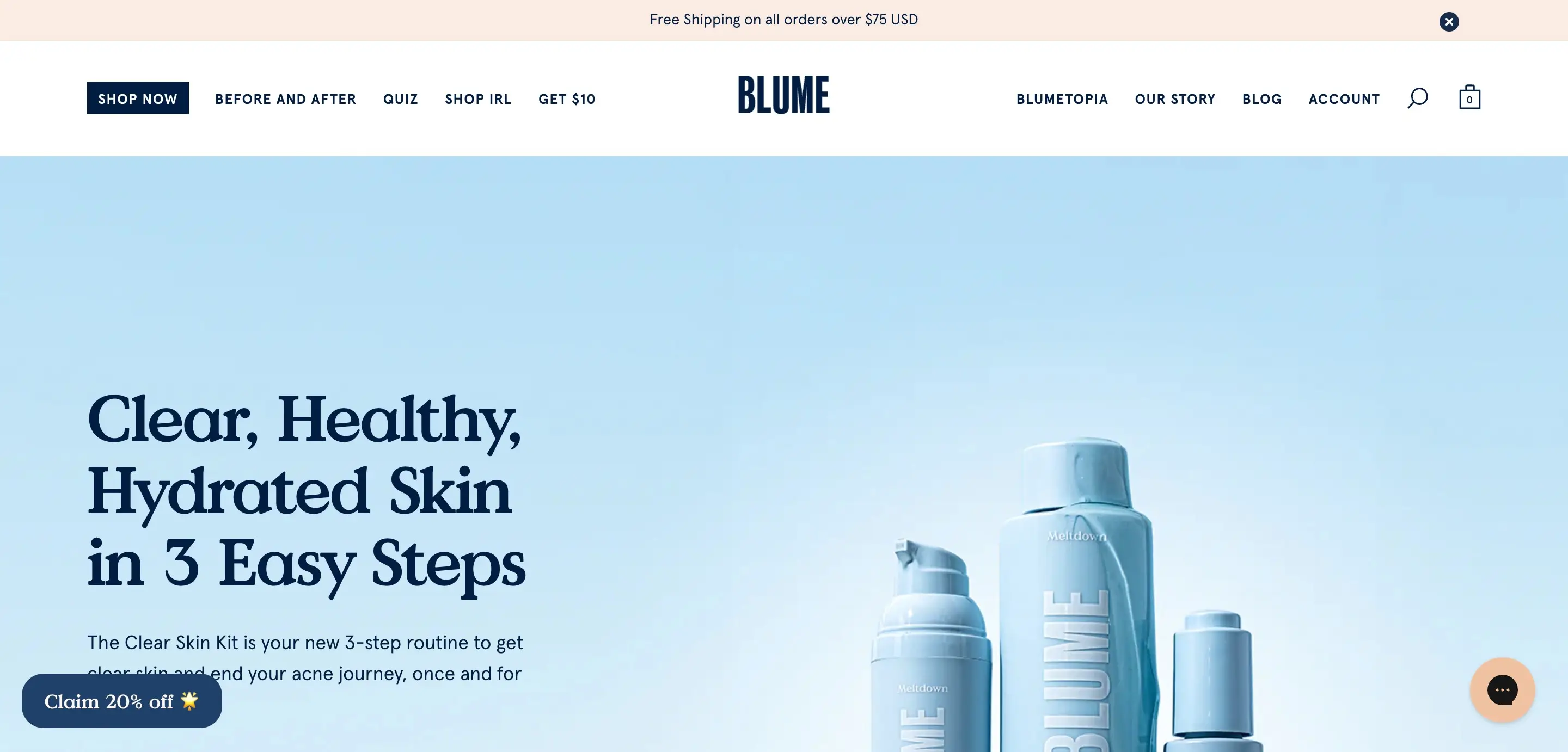
Blume’s website uses typography to convey a soft, clean, and trustworthy brand identity. The Value Serif font used for headings introduces a relaxed formality, giving the site a refined but approachable tone that aligns well with their natural, personal care products.
Paired with generous space and a calming color palette, the typography helps differentiate Blume from generic drugstore brands and reinforces the feeling of a gentle, human-centered skincare experience.
BASIC Moves®

BASIC Moves® embraces bold, oversized typography with a minimalist and high-contrast aesthetic, creating a striking and modern visual experience. The use of large, outlined sans-serif letters layered across the screen enhances the sense of movement, aligning perfectly with the theme.
The balance between light and heavy typography, combined with a dark background and subtle text elements, gives the design a sleek, editorial feel. This typography approach makes a strong statement while maintaining a refined and contemporary edge.
Eyewear

Evewear’s inspiration typography mirrors the softness and whimsy of its brand. The site uses a quaint serif font, likely a variation of Columbia Sans, that blends gentle curves with just the right amount of personality, perfect for a sustainable sleepwear brand.
The mix of pastel colors, playful illustrations, and elegant type gives the design a dreamy, approachable feel without sacrificing clarity. This typography choice enhances the brand’s mission of comfort and care, creating an experience that feels as cozy as the garments themselves.
Pink Chili

Pink Chili’s website grabs attention with its bold, expressive typography that feels unapologetically Gen Z. The chunky, red serif font used for the logo creates an immediate impact, mixing vintage flair with a fresh, rebellious twist.
With minimal imagery and a copy-driven layout, the site relies on typography to carry the brand’s tone - confident, playful, and full of personality. Careful typographic choices, including size, spacing, and color, allow the design to feel dynamic while maintaining clarity and ease of navigation.
Derek McKechnie

Derek McKechnie’s portfolio is a bold typographic experiment that turns conventional layout rules on their head. The site’s grid background sets the stage for a collage-style mix of serif and sans-serif typefaces, oriented in multiple directions to create a dynamic, immersive experience.
The serif font brings elegance and artistic flair, while the clean sans-serif labels maintain clarity and usability. Combined with motion effects and striking visual contrast, this “more is more” approach transforms typography into an expressive design element that doubles as navigation.
Dana Barkay

Dana Barkay’s portfolio is a showcase of bold, expressive typography used with intent and precision. As a font designer, she uses her homepage to highlight her type expertise, balancing chunky, custom letterforms with clean, geometric sans-serifs for contrast and legibility.
The grid layout provides clear visual hierarchy, while interactive scroll and hover effects bring the text to life. It’s a striking example of how typography can serve as both content and design, reinforcing personality without overwhelming the user.
Conclusion
Typography is one of the most overlooked yet powerful tools in web design. It influences how users read, feel, and interact with your content, often before they’ve processed a single word. From setting the tone of your brand to improving readability and accessibility, great typography can elevate your entire digital presence.
If you’re building a website or refreshing your brand, don’t underestimate the impact of strong typography examples choices. As a designer and developer, I specialize in creating thoughtful, visually compelling websites, with typography that not only looks great but also works for your audience.
Need help choosing the right fonts or designing a site that truly reflects your brand? Let’s connect and build something beautiful - one letter at a time.
Design Your Next Success
Partner with me to create exceptional brand identity.