Blog
Our blog

0min
|
Web Design
|
Essential Website Components for Effective Web Design
A well-designed website is not just a digital presence but a strategic asset that influences user engagement, brand perception, and conversions. Every detail, from layout and typography to navigation and security, plays a role in shaping how visitors interact with a website.
Understanding the key website components is essential for businesses and individuals who want to create an effective online platform. A successful website should be visually appealing, easy to navigate, optimized for search engines, and built with user experience in mind.
In this guide, we will explore the most critical components of a website, explaining how each contributes to a well-functioning and high-performing digital experience.

1. User-Friendly Navigation
Navigation is one of the most critical website components that directly impacts user experience. A confusing or poorly structured menu can drive visitors away, while an intuitive system encourages them to explore further.
Best Practices for Navigation:
- Use a well-organized menu structure that helps users find key pages quickly.
- Implement a hierarchical navigation system, ensuring that important pages are easily accessible from the main menu.
- Add breadcrumb navigation to show users where they are on the site and help them navigate back easily.
- Include a search bar for quick access to specific content, especially for websites with a large number of pages.
- Maintain consistent navigation across all pages to ensure a seamless browsing experience.
A website with well-structured navigation makes it easy for visitors to access different web page components without confusion, improving both engagement and retention.
2. Responsive and Mobile-Friendly Design
With the increasing dominance of mobile browsing, a responsive website is one of the most important website essentials. A website must function seamlessly across desktops, tablets, and smartphones to provide a smooth user experience.
Key Considerations for Mobile-Friendly Design:
- Use a responsive grid layout that adapts to different screen sizes without distortion.
- Optimize images and media to reduce loading times on mobile networks.
- Ensure all clickable elements, such as buttons and links, are large enough for touch navigation.
- Utilize adaptive typography that adjusts to screen size for improved readability.
- Test the website using Google’s Mobile-Friendly Test to ensure full responsiveness.
A website that is not optimized for mobile users risks losing a significant portion of potential visitors. A responsive design ensures that every visitor, regardless of device, enjoys a fully functional experience.
3. Fast Loading Speed
Page speed is a crucial factor for both user satisfaction and search engine rankings. Websites that take too long to load often experience high bounce rates and lower conversions.
Ways to Improve Loading Speed:
- Use tools such as TinyPNG or WebP formats to compress images and reduce their file sizes.
- Enable browser caching to store frequently accessed resources and reduce load times.
- Use a content delivery network (CDN) to serve content from the nearest server to the user.
- Minimize HTTP requests by reducing excessive scripts and plugins.
- Enable lazy loading for images and videos to prioritize the loading of above-the-fold content.
A fast-loading website enhances user experience, boosts engagement, and improves overall website performance. The speed of individual components' websites plays a vital role in keeping visitors engaged and encouraging them to explore further.
4. Clear and Engaging Call-to-Actions (CTAs)
Call-to-actions guide users toward specific goals, such as signing up for a service, making a purchase, or requesting more information. A well-placed and well-designed CTA is one of the most impactful website elements for conversions.
How to Create Effective CTAs:
- Utilize action-driven phrases like "Start Now" or "Get Your Download" to motivate users to take the next step.
- Position CTAs in high-visibility areas, such as above the fold or at the end of key content sections.
- Use contrasting colors and bold text to make CTAs stand out.
- Ensure CTAs are clear, concise, and relevant to the page content.
A strong CTA acts as a roadmap, guiding users toward completing a desired action while improving overall engagement and conversion rates.
5. High-Quality Visual Design and Branding
The visual design of a website significantly impacts first impressions. A well-designed site reflects professionalism, credibility, and brand identity.
Elements of Strong Visual Design:
- Apply a consistent color palette that reflects the brand's identity.
- Select legible typography that enhances readability across devices.
- Maintain a clean layout with appropriate white space to avoid clutter.
- Utilize high-quality images, icons, and graphics to improve visual appeal.
By incorporating strong branding elements, businesses can create a cohesive and memorable online presence.
6. Well-Structured and SEO-Friendly Content
Content is at the heart of any website, providing information, engaging users, and improving search engine visibility. Well-structured and SEO-optimized content ensures that a website is both user-friendly and discoverable.

Best Practices for Content Optimization:
- Use clear headings (H1, H2, H3, etc.) to structure content logically.
- Keep paragraphs concise and easy to read.
- Utilize bullet points and lists to highlight key takeaways.
- Incorporate relevant keywords naturally without overstuffing.
A well-structured website with optimized content enhances both user experience and search engine rankings, making it easier for visitors to find relevant information.
7. Trust Signals and Security Features
A secure and trustworthy website fosters confidence among users. Trust signals reassure visitors that their data is safe, while security features protect against potential threats.
How to Establish Trust and Security:
- Implement SSL certificates (HTTPS) for encrypted data transmission.
- Display customer testimonials and case studies to establish credibility.
- Clearly outline privacy policies and terms of service.
- Include trust badges and security certifications for online transactions.
By integrating strong trust signals, businesses can increase customer confidence and enhance website credibility.
8. Accessibility and Inclusivity
Web accessibility ensures that people with disabilities can navigate and interact with a website effectively. A truly inclusive website meets the needs of all users.
Key Accessibility Considerations:
- Add alt text to images for visually impaired users.
- Use high-contrast color schemes for better readability.
- Enable keyboard navigation for users who cannot use a mouse.
- Implement ARIA labels for improved screen reader compatibility.
Ensuring that a website is accessible to all users not only improves usability but also aligns with legal requirements and best practices.

9. Analytics and Performance Tracking
Monitoring website performance is essential for continuous improvement. Analytics tools provide valuable insights into user behavior and engagement metrics.
Important Metrics to Track:
- Bounce rate to measure how quickly visitors leave the site.
- Session duration to analyze how long users stay on a page.
- Conversion rates to track goal completions.
- Traffic sources to identify where visitors are coming from.
Tools like Google Analytics and Hotjar help businesses make data-driven decisions to optimize website performance.
Frequently Asked Questions (FAQ)
1. What are the key website components for effective design?
Essential website components include user-friendly navigation, mobile responsiveness, fast loading speed, clear CTAs, SEO-friendly content, and strong security features. Each plays a vital role in enhancing user experience and conversions.
2. What are the main types of websites?
Websites come in various types, including business websites, e-commerce stores, blogs, portfolios, landing pages, and membership sites. Each serves a specific purpose and requires tailored design elements.

3. Why is website speed important?
A fast-loading website improves user experience, lowers bounce rates, and enhances SEO rankings. Optimizing images, using caching, and minimizing scripts can significantly boost site performance.
4. How do CTAs improve conversions?
Call-to-actions (CTAs) guide users toward key actions, like signing up or making a purchase. Well-placed, clear, and compelling CTAs help drive engagement and increase conversions.
5. What makes a website mobile-friendly?
A mobile-friendly website adapts to different screen sizes, ensuring proper touch interactions, easy navigation, and fast loading times. Google prioritizes mobile-friendly sites in search rankings.
6. How can I track my website’s performance?
Tools like Google Analytics and Hotjar help monitor traffic, user behavior, and conversion rates. Tracking key metrics allows for data-driven improvements and better user experience.

Conclusion
A well-designed website is a combination of multiple factors that work together to create an engaging and functional user experience. By focusing on essential website components such as navigation, mobile responsiveness, speed, CTAs, visual design, content structure, trust signals, accessibility, and analytics, businesses can build a website that attracts, retains, and converts visitors.
Understanding main website components and optimizing each element ensures long-term success in an increasingly competitive digital landscape. By implementing these best practices, businesses can create an online presence that stands out and delivers real results.
Enhance Your Website’s Performance
Get expert web design and SEO-optimized content that drives results. Let's build a website that works for your business.

0min
|
Website
|
What Is a Website? Understanding Its Definition & Key Components
Over 1.5 billion websites exist today, with more than 200 million actively maintained. Websites are an essential part of the internet, serving as digital spaces where businesses, individuals, and organizations share information, connect with audiences, and provide services.
From simple personal blogs to complex e-commerce platforms, websites come in many forms, each designed for a specific purpose.
At its core, a website is a collection of web pages linked under a common domain name, accessible through a web browser. But what makes up a website, and how do different types serve various needs?
This article explores what is a website, and its key component you may encounter, offering a clear understanding of how websites function and their role in the online world.

What Is a Website?
A website is a collection of interconnected web pages that are accessible through the internet under a single domain name. The website definition encompasses a broad range of online platforms designed to share information, provide services, or facilitate communication between users.
Websites can vary from simple, static pages to complex, interactive platforms, depending on their purpose and functionality.
Websites are hosted on servers and can be accessed using web browsers like Google Chrome, Mozilla Firefox, or Safari. They can be created using various technologies, including HTML, CSS, and JavaScript, often supported by databases and content management systems (CMS) like Webflow, WordPress or Shopify.
What Is a Website CMS?
A Website CMS (Content Management System) is a platform that allows users to create, manage, and update website content without needing extensive coding knowledge. Some of the most popular CMS platforms include:
- WordPress – A widely used CMS for blogs, business sites, and e-commerce.
- Shopify – Ideal for online stores and e-commerce businesses.
- Drupal & Joomla – Suitable for complex and scalable websites.
Using a website CMS simplifies the website-building process, making it easier to manage design, content, and functionality.

What Are Websites Used For?
Websites have become an integral part of daily life, serving as digital hubs for communication, commerce, education, and entertainment. Whether you're reading a blog, shopping online, or accessing learning resources, websites offer convenience and instant access to information.
Websites can be personal, allowing individuals to share blogs, showcase portfolios, or explore hobbies. Businesses use websites as virtual storefronts where customers can browse products, make purchases, and seek customer support.
Educational institutions also rely on websites to distribute learning materials, connect with students, and provide essential updates. Similarly, nonprofits and organizations use websites to raise awareness, engage supporters, and facilitate donations.
Difference Between a Website, Web Page, and Web Server
Understanding the distinctions between a website, a web page, and a web server is essential for navigating the digital world effectively. Think of it like a shopping mall:
- The website is the entire mall, containing various stores.
- Each webpage is an individual store within the mall, offering different products or services.
- The web server is like the infrastructure that powers the mall, providing electricity, security, and storage for everything inside.
Now, let’s break down each term in detail.
What Is a Web Page?
A web page is a single digital document displayed in a web browser. Every website consists of multiple web pages linked together. For example, a homepage, an "About Us" page, or a product listing page are all individual web pages within a website. Clicking on a link to navigate from one section to another means you’re moving from one webpage to another within the same site.

What Is a Web Server?
A web server is a physical or cloud-based computer that stores all the files and data needed to display a website. When a user enters a website URL, the web server retrieves the necessary files and sends them to the browser, allowing the webpage to load. One web server can host multiple websites simultaneously.
What Is a Website?
A website is a collection of webpages grouped under a single domain name. It includes all the content, text, images, videos, and interactive elements that users interact with. Websites are built using web technologies such as HTML, CSS, and JavaScript, making them functional and visually appealing.
Key Difference Between a Website and a Web Server
It’s common to confuse websites with web servers. If a website is down, it usually means the web server is unresponsive. However, a web server is not the same as a website; it is simply the system that delivers website content to users.
For example:
- If someone says, “My website is not working,” it usually means their specific website is experiencing an issue.
- If someone says, “My web server is down,” it means multiple websites hosted on that server are affected.
Components of a Website
A website is made up of several key components that work together to create a functional and engaging user experience. These elements ensure that a website is visually appealing, easy to navigate, and accessible to users. Here are the essential components of a website:
1. Domain Name
A domain name is the unique address of a website on the internet (e.g., example.com). It serves as the website’s identity and allows users to access it easily without needing to remember an IP address.
2. Web Hosting
Web hosting is the service that stores a website’s files and makes them accessible on the internet. Hosting providers store website data on web servers, ensuring that users can access the site anytime.
3. Web Pages
A website consists of multiple web pages that contain content. Common pages include:
- Homepage: The main landing page that introduces visitors to the website.
- About Page: Provides information about the business or individual behind the site.
- Services or Products Page: Displays the offerings of a business.
- Contact Page: Includes contact details and ways to get in touch.
4. Navigation Menu
The navigation menu helps users move through the website easily. It includes links to different sections or pages, ensuring a smooth browsing experience.
5. Content (Text, Images, and Videos)
Content is the core of any website, including text, images, videos, and interactive elements. Well-structured and engaging content keeps visitors informed and engaged.
6. User Interface (UI) and Design
A website’s UI includes colors, fonts, buttons, and layout, ensuring a visually appealing and user-friendly experience. A well-designed UI enhances usability and accessibility.
7. Functionality and Features
Websites may include additional features such as:
- Forms (e.g., contact forms, sign-up forms)
- E-commerce functionality (shopping cart, payment gateway)
- Search bar to help users find specific content
- Interactive elements (sliders, pop-ups, animations)
8. Backend and Databases
For dynamic websites, a backend (server-side system) processes user requests and manages data. A database stores information such as user accounts, product details, and blog posts.
9. Security Features
Websites need security measures to protect user data and prevent attacks. Essential security components include:
- SSL Certificates (for HTTPS encryption)
- Firewalls
- Regular software updates

Why You Need a Website
In an increasingly digital world, having a website is essential for individuals, businesses, and organizations looking to establish a strong online presence. Whether you're running a business, building a personal brand, or sharing information, a website serves as a powerful tool for communication, engagement, and growth.
1. Establishes Credibility and Trust
A professional website helps build trust with your audience. Many consumers research businesses online before making a purchase. Without a website, potential customers may question your legitimacy or opt for a competitor with an established online presence.
2. Increases Visibility and Reach
Unlike physical locations, a website is accessible 24/7 from anywhere in the world. This allows you to reach a wider audience, attract new customers, and expand your influence beyond local markets.
3. Serves as a Central Hub for Information
Your website acts as a one-stop resource where visitors can find important details about your business, such as:
- Products and services
- Contact information
- Operating hours
- Customer testimonials
- Company background
4. Enhances Marketing and Branding
A website is a key component of any digital marketing strategy. It helps you:
- Improve search engine visibility (SEO)
- Run online advertising campaigns (Google Ads, social media ads)
- Showcase brand identity through custom design, colors, and messaging
- Engage audiences with blogs, videos, and interactive content
5. Enables Online Sales and Bookings
For businesses, a website can function as an online store, allowing customers to browse and purchase products or book services anytime. E-commerce platforms make it easy to manage transactions securely.
6. Provides a Competitive Advantage
In most industries, competitors already have websites. Without one, you risk falling behind. A well-optimized website allows you to compete effectively by attracting potential customers through search engines, social media, and online ads.
7. Improves Customer Service and Communication
A website makes it easier for customers to contact you through:
- Live chat
- Contact forms
- FAQs
- Help center pages
This reduces the need for direct phone calls or emails, making customer support more efficient.

8. Cost-Effective and Scalable
A website offers a budget-friendly alternative to traditional advertising for promoting your business.It can grow with your needs, allowing you to add new features, services, or pages as your business expands.
9. Builds a Stronger Online Presence
In today’s digital world, people turn to the internet for everything, from finding services to learning new skills. Without a website, you miss out on valuable opportunities to engage and connect with your audience.
Conclusion
Websites play a crucial role in today's digital world, providing businesses, individuals, and organizations with a platform to connect, share, and grow. Whether it's a simple blog or a complex e-commerce site, a well-structured and optimized website enhances credibility, improves user experience, and expands reach.
If you're looking for a professional, user-friendly, and SEO-optimized website tailored to your needs, let's work together to bring your vision to life.

0min
|
Web Design
|
Why Is Web Design Important for Your Business?
A website is often a business’s first impression. Strong web design shapes how users interact with your brand and directly influences their trust and buying decisions.
A well-structured, visually appealing, and user-friendly website can improve engagement, enhance credibility, and drive conversions. This article is about why is web design important for businesses and how it impacts everything from brand perception to sales growth.
So, Why Is Web Design Important?
The first few seconds on your website can determine whether a visitor stays or leaves. In fact, 94% of first impressions are design-related, showing just how critical a well-structured, visually appealing site is for engaging visitors. Design, layout, and usability shape their perception instantly.

Your Website Creates an Instant Impression
The first few seconds on your website can determine whether a visitor stays or leaves. Design, layout, and usability shape their perception instantly. A modern, well-structured site signals professionalism, while a cluttered or outdated one can create doubt and push potential customers away.
For example, someone searching for a law firm visits two websites. One has a sleek, easy-to-navigate design with clear contact details. The other looks outdated and loads slowly. Most users will trust and choose the first one.
A strong first impression encourages visitors to stay, engage, and take action. A clean layout, fast loading speed, and clear messaging help build trust and keep users interested from the start.
A Strong Online Presence Attracts More Visitors
A well-designed website goes beyond aesthetics.It helps people find your business online. Search engines prioritize sites that are user-friendly, fast, and well-structured. If your website is difficult to navigate or slow to load, it may rank lower, making it harder for potential customers to discover you.
For example, a local bakery with a clean, mobile-friendly website featuring clear menus, location details, and customer reviews is more likely to show up in search results than a competitor with a poorly optimized site. The easier it is to find and use your website, the more visitors you’ll attract.
An effective online presence ensures that when people search for products or services like yours, they land on your site instead of a competitor’s. The right design keeps them engaged, turning visitors into loyal customers.
A User-Friendly Website Reflects Your Commitment to Customers
Your website is more than just a digital storefront, it shows how much you value your customers. If visitors can easily navigate your site, find information quickly, and complete actions without frustration, they’ll associate that smooth experience with your business as a whole.
On the other hand, a confusing or slow website can make them feel undervalued and push them toward competitors.
For example, imagine a customer looking for an appointment with a dental clinic. One website offers a clear, easy-to-use booking form, while another has outdated links and unclear instructions. The customer is far more likely to choose the clinic that made the process simple and stress-free.

A user-friendly design improves engagement, builds trust, and ensures that visitors have a positive experience from the moment they arrive. Prioritizing ease of use shows customers that you respect their time and care about their needs.
A Professional Look Builds Trust
People are more likely to do business with a company that looks credible and established. Your website’s design plays a key role in building that trust. If your site appears outdated, cluttered, or unprofessional, visitors may hesitate to engage with your brand. A polished, well-organized site reassures them that your business is legitimate and reliable.
Consider a customer looking for an online retailer. If they land on a website with:
- A clean, modern design
- Clear product descriptions and professional images
- Easy navigation and a secure checkout process
They will feel more confident making a purchase. On the other hand, a website with poor visuals, broken links, or missing information can create doubts about the company's credibility.
A professional design not only makes a strong first impression but also encourages users to trust your brand, engage with your content, and take action.
Staying Competitive Requires a Modern Website
In a crowded market, businesses with outdated or difficult-to-use websites risk losing potential customers to competitors with better online experiences. A modern, well-designed website helps you stand out and keeps visitors engaged. If your competitors offer a smoother browsing experience, faster load times, and clearer messaging, users are more likely to choose them instead.
For example, imagine two local fitness studios:
- One has a sleek, mobile-friendly website with an easy booking system and up-to-date class schedules.
- The other has an outdated design, slow load times, and no clear way to sign up.
Most potential customers will choose the first studio because it’s easier to use and more inviting. A modern website isn’t just about appearance; it’s about providing a seamless experience that keeps users coming back instead of turning to competitors.
A Consistent Brand Experience Increases Recognition
A strong brand is built on consistency, and your website should reflect that at every touchpoint. When colors, fonts, messaging, and design elements remain uniform across all pages, visitors can instantly recognize and connect with your business.

The web designing importance in branding is undeniable. A cohesive and professional website strengthens recognition and builds trust, ensuring that customers remember your business and feel confident engaging with it.
Consider a customer browsing two competing clothing brands:
- One has a cohesive website where the colors, typography, and tone match its social media and marketing materials.
- The other has an inconsistent design, with different styles on each page and conflicting messaging.
The first brand appears more professional and memorable, making it easier for customers to recall and trust. A consistent brand experience not only strengthens recognition but also builds loyalty, keeping customers engaged and encouraging repeat visits.
Your Business is Always Accessible Online
Unlike a physical store with set hours, a website keeps your business open 24/7. Customers can browse products, learn about your services, or contact you anytime, whether it’s during the day, late at night, or on weekends. This constant accessibility makes it easier for potential customers to engage with your brand on their schedule.
For example, imagine someone looking for a local repair service late at night. If your website provides clear information about your offerings, pricing, and a way to request service, they can take action immediately. If your competitor’s site lacks these details or is difficult to navigate, they may lose the customer before business hours even begin.
A well-designed website ensures that people can always find the information they need, leading to more inquiries, sales, and long-term customer relationships.
Data Insights Help You Improve and Grow
A well-designed website does more than attract visitors, it provides valuable insights into their behavior. By analyzing website data, you can understand what works, what doesn’t, and how to improve the user experience to drive better results.
For example, tracking user interactions can reveal:
- Which pages attract the most engagement
- Where visitors drop off before completing a purchase or inquiry
- How different marketing efforts impact website traffic

Imagine an online store noticing that many users abandon their carts at the checkout page. With this insight, they can test different solutions, like simplifying the checkout process or offering free shipping, to increase conversions.
By using website analytics, businesses can make informed decisions, refine strategies, and continuously improve their online presence to better serve their audience.
Frequently Asked Questions
1. How often should I update my website’s design?
Web design trends and user expectations evolve over time. It’s recommended to refresh your website every 2–3 years to keep it modern, functional, and aligned with industry standards. Regular updates to content and performance should happen more frequently.
2. Does web design really impact sales and conversions?
Yes! A well-structured, visually appealing, and easy-to-navigate website encourages visitors to stay longer, engage with your content, and take action, whether that’s making a purchase, signing up for a service, or filling out a contact form.
3. How does web design differ from web development?
Web design focuses on the visual layout, branding, and user experience, while web development involves coding and functionality. Both are essential for creating a successful website.
4. How does mobile responsiveness affect my website?
More than half of web traffic comes from mobile devices. If your site isn’t mobile-friendly, users may leave quickly, leading to lost opportunities. Search engines also rank mobile-responsive sites higher.
5. What are the key elements of a well-designed website?
A high-quality website should have:
- A clean, modern layout
- Easy navigation
- Fast loading speed
- Mobile responsiveness
- Clear calls to action (CTAs)
- Consistent branding
- Secure and accessible features

6. Why is SEO important in web design?
Good web design enhances SEO by improving site speed, structure, and usability. Search engines favor websites that provide a seamless experience, making it easier for your business to rank higher and attract more visitors.
7. How much does professional web design cost?
Costs vary based on complexity, features, and design requirements. Simple websites may be more affordable, while custom-built, feature-rich websites require a larger investment. The cost should be viewed as a long-term investment in your brand’s online success.
8. Can I design my website myself, or should I hire a professional?
DIY website builders are available, but hiring a professional ensures a unique, high-performing site that aligns with your business goals. A professional designer considers UX, SEO, and branding, helping your site stand out from competitors.
Conclusion
A well-designed website is more than just a digital presence; it’s a powerful tool that shapes first impressions, builds trust, and drives business growth. From enhancing user experience to increasing visibility in search results, web design plays a critical role in attracting and retaining customers.
The web designing advantages are clear; it keeps your business competitive, ensures 24/7 accessibility, and provides valuable insights to refine your strategy over time.
If you want to unlock the full potential of a well-designed website, I can create a professional web design that enhances user experience, strengthens trust, and makes your business stand out. Let’s collaborate to bring your vision to life.

0min
|
Website
|
Web Design
|
Understanding Different Types of Websites and Their Roles
The internet is home to countless websites, each created for a specific goal. Some are built to sell products through smooth online shopping experiences, while others highlight creativity and skill through carefully crafted portfolios.
Websites serve many purposes; some inform, others connect, entertain, or persuade. But what makes them different? Why do their structures and goals vary so much? In this article, I’ll explore the most common types of websites, their unique roles, and how each shapes the way we experience the online world.
1. Business Websites

A business website serves as the digital identity of a company, helping it establish credibility, attract customers, and showcase its products or services. Whether it’s a large corporation or a small local business, having a professional website is essential for building trust and driving engagement.
A well-designed business website provides clear information about the company, its offerings, and how potential clients can connect or make inquiries. It also plays a crucial role in digital marketing strategies, improving visibility through SEO and online advertising.
Key Features of Business Websites:
- A professional homepage with a clear company introduction and call-to-action
- Dedicated pages for services, products, and company information
- Contact options such as phone, email, forms, or live chat
- Testimonials, case studies, or client success stories to build trust
- Blog or news section (optional) to provide industry insights and improve SEO
2. E-Commerce Websites

E-commerce websites are online stores that allow businesses to sell products or services directly to customers over the internet. These websites provide a seamless shopping experience, enabling users to browse products, add items to a cart, and complete purchases through secure payment gateways.
E-commerce platforms have revolutionized retail by offering convenience, a wider reach, and 24/7 availability, making them a crucial part of modern business. Whether it's a small handmade craft store or a global marketplace, e-commerce websites help businesses scale beyond physical locations.
Key Features of E-Commerce Websites:
- Product Listings: Detailed pages with images, descriptions, pricing, and reviews
- Shopping Cart & Checkout: A smooth purchasing process with multiple payment options
- Secure Payment Gateways: Integration with credit cards, PayPal, Apple Pay, and other systems
- User Accounts & Order Tracking: Allow customers to manage orders and track shipments
- SEO & Marketing Tools: Optimized product pages, email marketing, and promotions to drive sales
3. Portfolio Websites

A portfolio website is a digital showcase of an individual’s or company’s work, designed to highlight skills, projects, and achievements. These websites are essential for professionals in creative fields such as designers, photographers, writers, and developers, allowing them to present their expertise visually and attract potential clients or employers.
A well-structured portfolio website not only displays work samples but also tells a compelling story about the creator’s style, experience, and capabilities.
Key Features of Portfolio Websites:
- Showcase of Work: High-quality images, case studies, or live project links
- About Section: A personal introduction and professional background
- Contact Information: Inquiry forms, email, or social media links for easy outreach
- Testimonials & Client Logos: Social proof to establish credibility
- Responsive Design: Ensures the portfolio looks great on all devices
4. Blog Websites

A blog website is a platform where individuals or businesses regularly publish articles, insights, or opinions on specific topics. Blogs can be personal, professional, or niche-focused, covering subjects like travel, technology, fashion, health, and more.
Many businesses use blogs as part of their content marketing strategy to engage audiences, improve SEO, and establish thought leadership. Some blogs are monetized through ads, sponsorships, or affiliate marketing, turning them into full-fledged businesses.
Key Features of Blog Websites:
- Regularly Updated Content: Articles, guides, or opinion pieces published frequently
- Categorization & Tags: Helps organize content for easy navigation
- Comment Section: Encourages reader interaction and community building
- SEO Optimization: Structured for search engine visibility
- Monetization Options: Ad placements, affiliate links, or sponsored posts
5. News and Media Websites

News and media websites are dedicated to delivering real-time updates, reports, and analysis on current events, politics, business, entertainment, and more. These sites can range from global news organizations to niche media outlets focused on specific industries.
With the rise of digital journalism, many news websites now incorporate multimedia content, live reporting, and interactive elements to engage readers. Some operate on a subscription model, while others rely on ad revenue or donations.
Key Features of News and Media Websites:
- Breaking News & Updates: Real-time reporting on global or niche topics
- Categorized Content: Sections for politics, business, entertainment, sports, etc.
- Multimedia Integration: Videos, podcasts, and interactive infographics
- Subscription & Paywalls: Some offer free content, while others require subscriptions
- Fact-Checking & Credibility: Reliable sources and verified information to maintain trust
6. Educational Websites

Educational websites are designed to provide learning resources, courses, and training materials for students, professionals, and lifelong learners. These sites can range from online schools and universities to self-paced learning platforms and resource hubs.
Many educational websites offer interactive content, quizzes, certifications, and even full-degree programs, making knowledge more accessible to learners worldwide.
Key Features of Educational Websites:
- Courses & Learning Materials: Structured lessons, video tutorials, and e-books
- Interactive Content: Quizzes, assignments, and discussion forums for engagement
- Certifications & Degrees: Many platforms offer official certificates and accreditations
- User Progress Tracking: Personalized dashboards to monitor learning progress
- Accessibility & Mobile-Friendly Design: Ensures learning is available across devices
7. Entertainment Websites

Entertainment websites provide digital content for amusement, including streaming services, online magazines, gaming platforms, and viral media. These websites attract users with engaging videos, music, articles, or interactive experiences.
Many entertainment sites generate revenue through subscriptions, ads, or sponsorships, while others offer free content supported by in-platform purchases or merchandise sales.
Key Features of Entertainment Websites:
- Multimedia Content: Videos, music, games, articles, and interactive elements
- Streaming Services: On-demand content for movies, TV shows, and live broadcasts
- User Engagement: Comment sections, forums, and social sharing options
- Subscription Models: Free, freemium, or paid content access
- Personalization: AI-driven recommendations based on user preferences
8. Social Media Websites

Social media websites are platforms designed for networking, communication, and content sharing. They enable users to connect with friends, family, colleagues, or even global audiences through posts, images, videos, and real-time interactions.
Social media sites play a crucial role in digital marketing, brand promotion, and community building. Businesses, influencers, and individuals use these platforms to engage with their audience and drive online visibility.
Key Features of Social Media Websites:
- User Profiles & Feeds: Personalized content streams and interaction tools
- Content Sharing: Posts, images, videos, and live streaming options
- Messaging & Communication: Direct messages, group chats, and forums
- Engagement Metrics: Likes, comments, shares, and analytics for insights
- Advertising & Monetization: Paid promotions, influencer collaborations, and ad placements
9. Membership Websites

Membership websites offer exclusive content, services, or communities to users who sign up, often through a subscription model. These sites provide gated access to premium resources, such as online courses, industry insights, discussion forums, or digital downloads.
Businesses, educators, and creators use membership websites to generate recurring revenue while building a dedicated audience.
Key Features of Membership Websites:
- User Registration & Login: Restricted content access based on membership levels
- Subscription Tiers: Free, freemium, or paid membership options
- Exclusive Content & Perks: Courses, e-books, private communities, or premium articles
- Community Engagement: Forums, member directories, and exclusive events
- Automated Billing & Access Control: Manages subscriptions, renewals, and cancellations
10. Forum and Community Websites

Forum and community websites are designed to facilitate discussions, knowledge-sharing, and networking among users with common interests. These platforms allow users to ask questions, share insights, and engage in conversations through threads and posts.
They can be general-purpose discussion boards or niche communities focused on specific industries, hobbies, or professional topics. Some forums are public, while others require membership or invitations to participate.
Key Features of Forum and Community Websites:
- Discussion Threads & Categories: Organized topics for easy navigation
- User-Generated Content: Members create and engage with posts and comments
- Moderation & Rules: Community guidelines to maintain a healthy discussion environment
- Reputation & Ranking Systems: Upvotes, badges, or karma points for engagement recognition
- Private & Public Access Options: Open discussions or invite-only forums
11. Government Websites

Government websites serve as official digital platforms for public services, information, and regulatory updates. These websites are designed to provide citizens with essential resources, such as tax filing, legal documents, public records, and policy information.
Many government websites also include portals for online applications, citizen engagement, and emergency alerts, ensuring accessibility and transparency.
Key Features of Government Websites:
- Official Information & Resources: Laws, regulations, policies, and public services
- Citizen Services & Applications: Tax filing, permits, voter registration, and benefits programs
- Security & Compliance: High-level encryption and accessibility standards for public trust
- Emergency & Public Notices: Updates on natural disasters, health alerts, and security advisories
- Multi-Language Support: Accessibility for diverse populations
12. Nonprofit and Charity Websites

Nonprofit and charity websites serve as digital platforms for organizations that focus on social causes, fundraising, and advocacy. These websites aim to raise awareness, accept donations, and mobilize volunteers to support their missions.
They often include educational resources, success stories, and ways for visitors to get involved, making them a crucial tool for outreach and impact.
Key Features of Nonprofit and Charity Websites:
- Mission & Impact Stories: Clearly communicate the organization’s goals and achievements
- Donation & Fundraising Integration: Secure payment gateways for one-time and recurring donations
- Volunteer & Membership Sign-Ups: Opportunities for people to contribute their time and skills
- Educational & Advocacy Resources: Informational content to spread awareness about the cause
- Transparency & Reports: Financial disclosures and annual reports to build trust with donors
13. Personal Websites
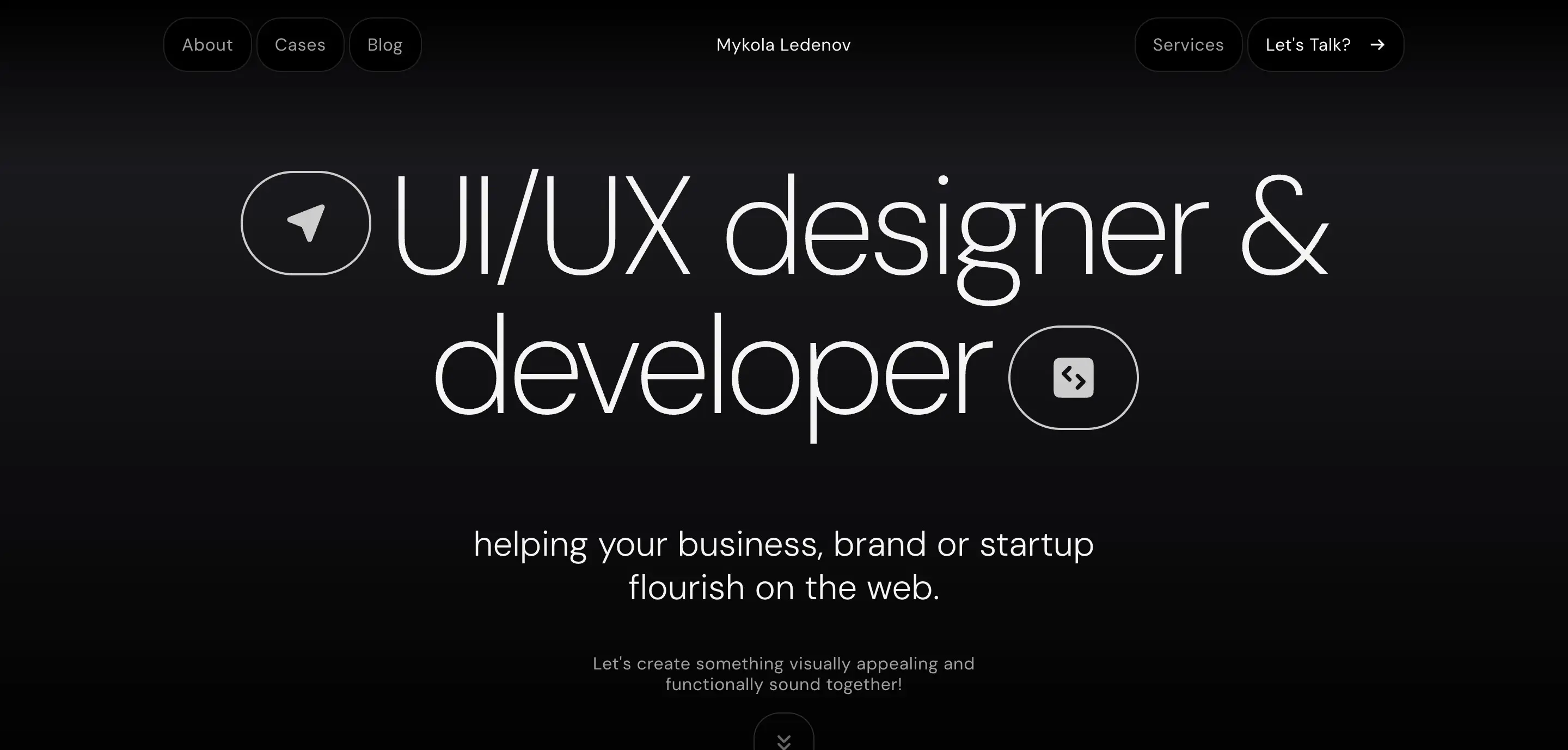
Personal websites are online spaces created by individuals to showcase their identity, achievements, and interests. They can serve as digital resumes, blogs, creative portfolios, or passion projects.
Whether used for professional branding, networking, or personal expression, these websites allow individuals to control their online presence and share their expertise or hobbies with a global audience.
Key Features of Personal Websites:
- About Me Section: Introduction, biography, and personal background
- Portfolio or Resume: Work samples, career history, and achievements
- Blog or Journal (Optional): Personal stories, opinions, or industry insights
- Contact & Social Links: Ways to connect via email or social media
- Minimalist & Unique Design: A reflection of the individual's personality and brand
14. Landing Pages

A landing page is a standalone web page designed for a specific marketing campaign, product promotion, or lead generation. Unlike traditional websites, landing pages have a singular focus, converting visitors into customers, subscribers, or leads through a compelling call-to-action (CTA).
They are commonly used in digital advertising, email marketing, and product launches to drive targeted results.
Key Features of Landing Pages:
- Single, Focused Objective: Promotes one product, service, or action
- Compelling Headline & Copy: Clear messaging that grabs attention and persuades users
- Strong Call-to-Action (CTA): Encourages visitors to sign up, buy, or learn more
- Minimal Navigation: Reduces distractions to keep users focused on the goal
- A/B Testing & Analytics: Optimized for conversions through data tracking
15. Directory and Listing Websites
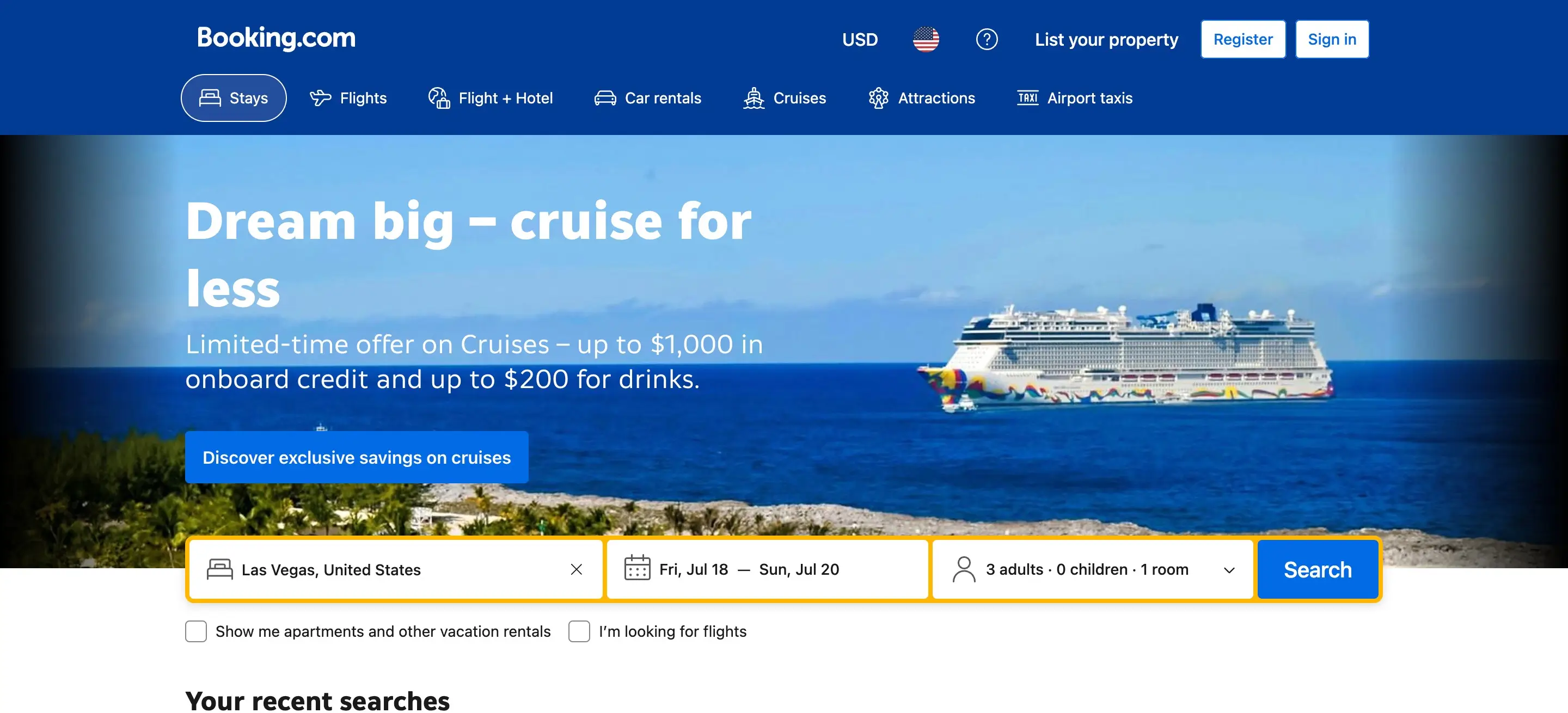
Directory and listing websites serve as online databases that help users find businesses, services, or specific information within a particular category. These websites organize and display listings in a structured format, often allowing users to search, filter, and review different options.
They are commonly used for business directories, job boards, real estate listings, and travel guides. Some operate as free directories, while others charge businesses for premium listings or advertising placements.
Key Features of Directory and Listing Websites:
- Search & Filtering Options: Helps users find relevant listings quickly
- Categorized Listings: Organized by industry, location, or service type
- Business Profiles & Reviews: Company details, customer ratings, and testimonials
- Monetization Features: Paid listings, featured placements, and ads
- User Submission Forms: Allows businesses or individuals to submit their listings
16. Wikis and Knowledge Bases

Wikis and knowledge bases are collaborative platforms designed to store, organize, and share information. These websites allow multiple users to contribute, edit, and update content, making them valuable for educational resources, company documentation, and community-driven knowledge sharing.
Wikis are typically open to public contributions, while knowledge bases are often restricted to specific organizations or user groups.
Key Features of Wikis and Knowledge Bases:
- Collaborative Editing: Users can create, edit, and improve content
- Structured Information: Categorized topics for easy navigation
- Search Functionality: Allows users to quickly find relevant information
- Version History & Moderation: Tracks edits and prevents misinformation
- Access Control (For Knowledge Bases): Public or private settings for internal documentation
Conclusion
A well-designed website is more than just an online presence; it’s a powerful tool that serves a specific purpose, whether it’s to inform, sell, engage, or connect. Various types of websites play a unique role in shaping user experiences and driving meaningful interactions.
By understanding the structure and functionality of different websites, businesses and individuals can make strategic decisions that align with their goals.
If you need a website that not only looks great but also serves its purpose effectively, I’m here to help. Whether it’s a business website, e-commerce store, portfolio, or landing page, I create intuitive, user-friendly designs tailored to your needs.

0min
|
News
|
Elon Musk’s xAI Unveils Grok 3: A Powerful AI Challenger
Elon Musk’s AI company, xAI, has officially introduced Grok 3, a next-generation AI model designed to compete at the highest level with OpenAI’s GPT-4o and DeepSeek’s V3. With significant improvements in reasoning, mathematics, and coding, Grok 3 represents a major leap forward in AI capabilities.
Trained on xAI’s powerful Colossus supercomputer, which boasts over 200,000 GPUs, Grok 3 pushes the boundaries of intelligent computing, making it one of the most advanced AI models available. The release follows xAI’s commitment to creating an AI platform that prioritizes free speech and independent reasoning, differentiating it from competitors.
With enhanced reasoning capabilities, the introduction of DeepSearch, and expanded API access for businesses, Grok 3 is set to redefine the AI landscape.

Grok 3’s Key Features: What’s New?
Advanced Reasoning and Thought Process Capabilities
One of the most notable upgrades in Grok 3 is its ability to engage in multi-step logical reasoning, allowing users to solve complex problems in mathematics, coding, and science.
The new “Think” and “Big Brain” modes allow Grok 3 to:
- Break down problems into detailed, logical steps.
- Provide structured explanations similar to how a human expert would reason.
- Offer better problem-solving insights for programmers, researchers, and students.
These upgrades aim to reduce AI hallucinations (incorrect responses) and improve accuracy, making Grok 3 a more reliable and trustworthy AI assistant.
DeepSearch: AI-Powered Research Like Never Before
Another standout feature is DeepSearch, allowing Grok 3 to perform in-depth online searches and generate comprehensive summaries based on real-time information.
Unlike traditional AI chatbots, Grok 3 does not rely solely on pre-trained data. Instead, it actively searches the internet for the most up-to-date, relevant insights.
- It synthesizes multiple viewpoints, providing more well-rounded and accurate responses.
- It functions as a real-time research tool, making it particularly valuable for journalists, analysts, and researchers.
By offering live data retrieval, Grok 3 takes AI-powered research to the next level, competing with Perplexity AI and OpenAI’s browsing mode.

API and Business Integration: A Step Toward Enterprise AI
Unlike earlier versions, Grok 3 is now positioned as an enterprise-friendly AI, allowing companies to integrate its advanced reasoning and data processing capabilities into their workflows.
Initially available only to X Premium+ subscribers, Grok 3 is now open to all users on X and Grok.com. While free users can explore its core functions, premium subscribers gain access to advanced AI capabilities, making Grok 3 a scalable solution for both casual users and businesses.
In addition to expanding public access, xAI is rolling out an enterprise API, enabling businesses to seamlessly integrate Grok 3’s reasoning and research tools into their own applications.
How Does Grok 3 Compare to OpenAI’s GPT-4o?
With the AI race intensifying, Grok 3 is emerging as a direct competitor to OpenAI’s GPT-4o and DeepSeek V3.
One of Grok 3’s most powerful features is DeepSearch, which enables real-time web searches, allowing users to access the most current, contextually relevant information.
In contrast, OpenAI’s GPT-4o lacks a dedicated browsing mode, limiting its ability to retrieve live data, an essential capability for AI-driven research and analysis.
Meanwhile, DeepSeek V3 continues to dominate logic-based problem-solving and structured computation, making it a strong competitor for users focused on programming, mathematics, and academic research. However, Grok 3’s enhanced reasoning features and multimodal integration make it a versatile option for a wider range of applications.
What’s Next for xAI and Grok 3?
Elon Musk has made it clear that Grok 3 is just the beginning. Looking ahead, xAI has hinted at several upcoming developments:
- Grok 4, which will feature even stronger reasoning capabilities and multimodal AI integration.
- Scaling up the Colossus supercomputer to support faster AI training and enhancements.
- Expanding enterprise AI solutions, with a focus on custom business applications and integrations.
As competition for AI dominance continues to escalate, xAI is positioning itself as a major player, directly challenging OpenAI, DeepMind, and emerging AI companies.
Conclusion: Is Grok 3 a Game-Changer?
The release of Grok 3 marks a significant milestone for xAI, showcasing advancements in reasoning, real-time research, and enterprise integration.
xAI is proving itself as a serious AI competitor in the battle against OpenAI. Grok 3’s features, particularly DeepSearch, set it apart from existing AI models.
Musk’s vision for AI is actively shaping the competitive landscape of intelligent computing. As Grok 3 steps up as a direct challenger to OpenAI, its long-term impact will depend on widespread adoption and real-world performance.
In the coming months, as businesses and individual users put Grok 3 to the test, its role in the future of AI will become clear, whether as an industry disruptor or a niche alternative.
This article is based on publicly available reports and company statements.

0min
|
News
|
IKEA Slides Into Sleepless Canadians’ DMs with a Late-Night Marketing Stunt
In a bold and unexpected marketing move, IKEA Canada has launched a campaign targeting night owls and sleepless social media users. Between 10 PM and 5 AM, IKEA sent cheeky direct messages (DMs) on Instagram with the classic late-night phrase: "u up?"
But instead of just making small talk, the brand had a purpose, helping Canadians sleep better. Those who responded to the message received a 15% discount on IKEA mattresses, while a lucky few even got a free mattress.
This campaign, created in collaboration with Rethink, is part of IKEA’s broader strategy to promote better sleep habits while engaging customers in a fun and interactive way.
IKEA’s “U Up?” Campaign: The Details
- The campaign ran between 10 PM and 5 AM, aiming to connect with people scrolling late at night - a sign they might not be getting enough rest.
- Instagram users received a direct message (DM) from IKEA Canada, opening with "u up?" - a phrase often associated with casual late-night chats.
- Those who engaged with the message were rewarded with a 15% discount on mattresses. Some were even gifted a mattress for free.

Beyond this creative marketing push, IKEA Canada has also been making strategic financial moves to maintain its position as a leader in home furnishings.
IKEA Canada has consistently demonstrated a commitment to affordability and customer engagement through innovative marketing strategies. In fiscal year 2024, the company reported annual sales of $2.87 billion, reflecting a slight decrease of 1.4% compared to the previous year.
However, instead of scaling back, IKEA doubled down on affordability, reducing prices on over 1,500 products, including popular items like the STRANDMON Armchair and BILLY Bookcase. This initiative aligns with the brand’s mission of making home essentials accessible while maintaining high engagement with customers.
These affordability efforts further reinforce why the “U Up?” campaign is more than just a fun gimmick - it’s part of a larger strategy to attract, engage, and retain customers while promoting better sleep and comfort.
Why This Campaign Works: IKEA’s Clever Strategy
IKEA has a reputation for creative, outside-the-box marketing, and this campaign is another example of its ability to blend humor, social engagement, and product promotion.
Here’s why this campaign is a success:
- It plays on relatable internet culture – The phrase "u up?" is instantly recognizable to social media users.
- It engages customers directly – IKEA’s use of DMs feels personal and interactive, making customers feel like part of an inside joke.
- It ties humor to real product benefits – Instead of just being funny, the campaign also promotes better sleep and mattress sales.
- It creates a viral effect – People are more likely to share a campaign when it’s funny, unexpected, and rewarding.
This approach allows IKEA to stay relevant to younger audiences while reinforcing its position as a home and lifestyle brand focused on comfort and well-being.
Consumer Reactions & Industry Response
The campaign quickly gained traction online, with social media users sharing screenshots of their DM interactions with IKEA. Many praised the humor and creativity behind the campaign, with some even joking that they "fell for IKEA’s smooth talk."
Beyond consumers, the campaign has also been well-received by marketing experts, who see it as a brilliant mix of humor, personalization, and brand storytelling.
Jacqueline Wark, IKEA Canada's Director of Marketing Communications, explained the company’s intent behind the campaign:
“We’re passionate about helping Canadians curate each and every room in their homes, and we especially want to help them get the good night’s rest that they deserve.”
This quote reinforces IKEA’s mission to improve home living, making the campaign feel genuine rather than just a gimmick.
What’s Next? Could This Become a Global Trend?
Given the massive engagement IKEA’s campaign received in Canada, it raises the question: Could IKEA expand this concept globally?
- The campaign’s success suggests that similar interactive social media strategies could work in other markets.
- IKEA might extend the campaign beyond mattresses, offering discounts on other sleep-related products like pillows, duvets, and blackout curtains.
- Other brands could follow suit, adopting playful, conversational marketing tactics to engage customers in unexpected ways.
If anything, this campaign proves that marketing doesn’t always have to be serious, sometimes, all it takes is a well-timed “u up?” to grab attention.
At the end of the day, IKEA has done what few brands successfully achiev - ,it turned a simple DM into a conversation starter, a sales driver, and a viral sensation.
This article is based on publicly available reports and company statements.
Design Your Next Success
Partner with me to create exceptional brand identity.